Fake Alert : Total PC Defender
1.20 MB (1,265,664 bytes)
MD5: CE9D6A5C1883AD458D402728485529D3
SHA-1: 36D075D3AF35FE6A1388724DA24974857219FA3F
=======================================================
| Antivirus | Version | Last Update | Result |
|---|---|---|---|
| a-squared | 4.5.0.50 | 2010.02.24 | - |
| AhnLab-V3 | 5.0.0.2 | 2010.02.24 | - |
| AntiVir | 8.2.1.172 | 2010.02.24 | TR/Dropper.Gen |
| Antiy-AVL | 2.0.3.7 | 2010.02.24 | - |
| Authentium | 5.2.0.5 | 2010.02.24 | - |
| Avast | 4.8.1351.0 | 2010.02.24 | - |
| AVG | 9.0.0.730 | 2010.02.24 | - |
| BitDefender | 7.2 | 2010.02.25 | - |
| CAT-QuickHeal | 10.00 | 2010.02.24 | - |
| ClamAV | 0.96.0.0-git | 2010.02.25 | - |
| Comodo | 4053 | 2010.02.25 | - |
| DrWeb | 5.0.1.12222 | 2010.02.25 | - |
| eSafe | 7.0.17.0 | 2010.02.24 | - |
| eTrust-Vet | 35.2.7327 | 2010.02.24 | - |
| F-Prot | 4.5.1.85 | 2010.02.24 | - |
| F-Secure | 9.0.15370.0 | 2010.02.25 | - |
| Fortinet | 4.0.14.0 | 2010.02.21 | - |
| GData | 19 | 2010.02.25 | - |
| Ikarus | T3.1.1.80.0 | 2010.02.24 | - |
| Jiangmin | 13.0.900 | 2010.02.24 | - |
| K7AntiVirus | 7.10.981 | 2010.02.23 | - |
| Kaspersky | 7.0.0.125 | 2010.02.25 | - |
| McAfee | 5902 | 2010.02.24 | - |
| McAfee+Artemis | 5902 | 2010.02.24 | - |
| McAfee-GW-Edition | 6.8.5 | 2010.02.24 | Trojan.Dropper.Gen |
| Microsoft | 1.5502 | 2010.02.25 | - |
| NOD32 | 4893 | 2010.02.24 | - |
| Norman | 6.04.08 | 2010.02.24 | - |
| nProtect | 2009.1.8.0 | 2010.02.24 | - |
| Panda | 10.0.2.2 | 2010.02.24 | - |
| PCTools | 7.0.3.5 | 2010.02.24 | - |
| Prevx | 3.0 | 2010.02.25 | - |
| Rising | 22.34.01.03 | 2010.02.11 | - |
| Sophos | 4.50.0 | 2010.02.25 | - |
| Sunbelt | 5697 | 2010.02.24 | - |
| Symantec | 20091.2.0.41 | 2010.02.25 | Suspicious.Insight |
| TheHacker | 6.5.1.6.209 | 2010.02.25 | - |
| TrendMicro | 9.120.0.1004 | 2010.02.24 | - |
| VBA32 | 3.12.12.2 | 2010.02.24 | - |
| ViRobot | 2010.2.24.2200 | 2010.02.24 | - |
| VirusBuster | 5.0.27.0 | 2010.02.24 | - |
-------------------------------------------------------------------------------

File Created
%ProgramsDir%\Total PC Defender\Total PC Defender.exe
%AppDataDir%\Microsoft\Internet Explorer\Quick Launch\Total PC Defender.lnk
%DesktopDir%\Total PC Defender.lnk
%StartMenuDir%\Total PC Defender\Total PC Defender.lnk
%ProgramsDir% = C:\Program Files
%AppDataDir% = C:\Documents and Settings\[UserName]\Application Data
%DesktopDir% = C:\Documents and Settings\[UserName]\Desktop
%StartMenuDir% = C:\Documents and Settings\Administrator\Start Menu
Registry Modified
Keys Added
%ProgramsDir%\Total PC Defender\Total PC Defender.exe
%AppDataDir%\Microsoft\Internet Explorer\Quick Launch\Total PC Defender.lnk
%DesktopDir%\Total PC Defender.lnk
%StartMenuDir%\Total PC Defender\Total PC Defender.lnk
%ProgramsDir% = C:\Program Files
%AppDataDir% = C:\Documents and Settings\[UserName]\Application Data
%DesktopDir% = C:\Documents and Settings\[UserName]\Desktop
%StartMenuDir% = C:\Documents and Settings\Administrator\Start Menu
Registry Modified
Keys Added
HKLM\SOFTWARE\ESET\ESET Security\CurrentVersion\Plugins\01000200\
Profiles\@My profile\UrlSets\Node_00000001
HKLM\SOFTWARE\ESET\ESET Security\CurrentVersion\Plugins\01000200\
Profiles\@My profile\UrlSets\Node_00000002
HKLM\SOFTWARE\Microsoft\Windows\CurrentVersion\policies\system\SOFTWARE
HKLM\SOFTWARE\Microsoft\Windows\CurrentVersion\policies\system\SOFTWARE\
Microsoft
HKLM\SOFTWARE\Microsoft\Windows\CurrentVersion\policies\system\SOFTWARE\
Microsoft\Windows NT
HKLM\SOFTWARE\Microsoft\Windows\CurrentVersion\policies\system\SOFTWARE\
Microsoft\Windows NT\CurrentVersion
HKLM\SOFTWARE\Microsoft\Windows\CurrentVersion\policies\system\SOFTWARE\
Microsoft\Windows NT\CurrentVersion\Winlogon
HKCU\Software\ESET\ESET Security\CurrentVersion\HiddenMessage
HKCU\Software\ESET\ESET Security\CurrentVersion\ShellExt
HKCU\Software\Microsoft\Windows\CurrentVersion\Explorer\MenuOrder\
Start Menu\Total PC Defender
HKCU\Software\Microsoft\Windows\CurrentVersion\Policies\System
HKCU\Software\Microsoft\Windows\CurrentVersion\Policies\System\Software
HKCU\Software\Microsoft\Windows\CurrentVersion\Policies\System\Software\
Microsoft
HKCU\Software\Microsoft\Windows\CurrentVersion\Policies\System\Software\
Microsoft\Windows
HKCU\Software\Microsoft\Windows\CurrentVersion\Policies\System\Software\
Microsoft\Windows\CurrentVersion
HKCU\Software\Microsoft\Windows\CurrentVersion\Policies\System\Software\
Microsoft\Windows\CurrentVersion\Group Policy Objects
HKCU\Software\Microsoft\Windows\CurrentVersion\Policies\System\Software\
Microsoft\Windows\CurrentVersion\Group Policy Objects\LocalUser
HKCU\Software\Microsoft\Windows\CurrentVersion\Policies\System\Software\
Microsoft\Windows\CurrentVersion\Group Policy Objects\LocalUser\Software
HKCU\Software\Microsoft\Windows\CurrentVersion\Policies\System\Software\
Microsoft\Windows\CurrentVersion\Group Policy Objects\LocalUser\Software\Microsoft
HKCU\Software\Microsoft\Windows\CurrentVersion\Policies\System\Software\
Microsoft\Windows\CurrentVersion\
Group Policy Objects\LocalUser\Software\Microsoft\Windows
HKCU\Software\Microsoft\Windows\CurrentVersion\Policies\System\Software\
Microsoft\Windows\CurrentVersion\
Group Policy Objects\LocalUser\Software\Microsoft\Windows\CurrentVersion
HKCU\Software\Microsoft\Windows\CurrentVersion\Policies\System\Software\
Microsoft\Windows\CurrentVersion\Group Policy Objects\LocalUser\Software\Microsoft\Windows\CurrentVersion\Policies
HKCU\Software\Microsoft\Windows\CurrentVersion\Policies\System\Software\
Microsoft\Windows\CurrentVersion\Group Policy Objects\LocalUser\Software\Microsoft\Windows\CurrentVersion\Policies\System
HKCU\Software\Microsoft\Windows\CurrentVersion\Uninstall\Total PC Defender
HKCU\Software\5E6227B1B8F215EC1F89E06809861A7C
------------------------------------------------------------------------
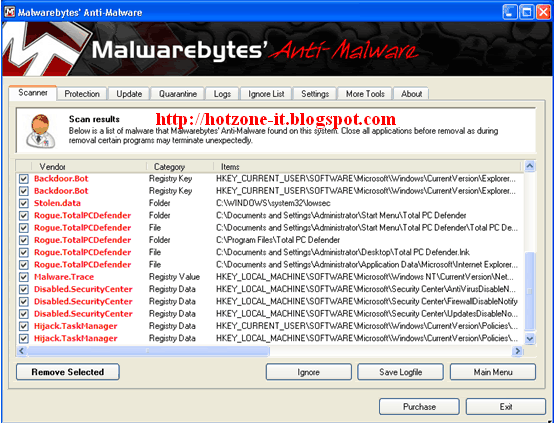
วิธีกำจัด/แก้ไข : Fake Alert : Total PC Defender
------------------------------------------------------------------------
Download : Malwarebytes's Anti-Malware

ไม่มีความคิดเห็น:
แสดงความคิดเห็น