"Malware Fix รวมวิธีแก้ปัญหา virus computer โครงการทำดีเพื่อสังคม" "ต้องขออภัยผู้เยี่ยมชมทุกท่านนะครับ ที่เ้ข้ามาแล้ว ไม่ค่อยได้มีการ update หรือทดสอบ virus ตัวใหม่ๆ เนื่องจากภาระหน้าที่การงาน"

Alert


Photobucket
แจ้งเตือนภัย ! Crypt0L0cker (Ransomware)
เข้ารหัสข้อมูลใน คอมพิวเตอร์ กำลังระบาดในไทย
และกำลังระบาดหนักในเกาหลี
ThaiCERT , Crytpo Prevention Tool

*ห้ามจ่ายเงินโดยเด็ดขาด เพราะจะเสียทั่้งเงินและกู้ข้อมูลไม่ได้
รบกวนคนที่เข้ามาอ่านช่วยแชร์ด้วยนะครับ
How to remove Crypt0L0cker
แสดงบทความที่มีป้ายกำกับ Malware แสดงบทความทั้งหมด

3/24/2559

How to manually create Software Restriction Policies to block TorrentLocker

วิธี Set Local Security Policy ป้องกัน CryptoLocker (Ransomware)
How to manually create Software Restriction Policies to block TorrentLocker:
In order to manually create the Software Restriction Policies you need to be using Windows Professional or Windows Server. If you want to set these policies for a particular computer you can use the Local Security Policy Editor. If you wish to set these policies for the entire domain, then you need to use the Group Policy Editor. Unfortunately, if you are a Windows Home user, the Local Policy Editor is not available and you should use the CryptoPrevent tool instead to set these policies. To open the Local Security Policy editor, click on the Start button and type Local Security Policy and select the search result that appears. You can open the Group Policy Editor by typing Group Policy instead. In this guide we will use the Local Security Policy Editor in our examples.
Once you open the Local Security Policy Editor, you will see a screen similar to the one below.
Local Security Policy Editor
Once the above screen is open, expand Security Settings and then click on the Software Restriction Policies section. If you do not see the items in the right pane as shown above, you will need to add a new policy. To do this click on the Action button and select New Software Restriction Policies. This will then enable the policy and the right pane will appear as in the image above. You should then click on the Additional Rules category and then right-click in the right pane and select New Path Rule.... You should then add a Path Rule for each of the items listed below.
If the Software Restriction Policies cause issues when trying to run legitimate applications, you should see this section on how to enable specific applications.
Below are a few Path Rules that are suggested you use to not only block the infections from running, but also to block attachments from being executed when opened in an e-mail client.
Block TorrentLocker executable in %AppData%
Path: %AppData%\*.exe
Security Level: Disallowed
Description: Don't allow executables to run from %AppData%.
Block TorrentLocker executable in %LocalAppData%
Path if using Windows XP: %UserProfile%\Local Settings\*.exe
Path if using Windows Vista/7/8: %LocalAppData%\*.exe
Security Level: Disallowed
Description: Don't allow executables to run from %AppData%.
Block Zbot executable in %AppData%
Path: %AppData%\*\*.exe
Security Level: Disallowed
Description: Don't allow executables to run from immediate subfolders of %AppData%.
Block Zbot executable in %LocalAppData%
Path if using Windows XP: %UserProfile%\Local Settings\*\*.exe
Path if using Windows Vista/7/8: %LocalAppData%\*\*.exe
Security Level: Disallowed
Description: Don't allow executables to run from immediate subfolders of %AppData%.
Block executables run from archive attachments opened with WinRAR:
Path if using Windows XP: %UserProfile%\Local Settings\Temp\Rar*\*.exe
Path if using Windows Vista/7/8: %LocalAppData%\Temp\Rar*\*.exe
Security Level: Disallowed

Description: Block executables run from archive attachments opened with WinRAR.
Block executables run from archive attachments opened with 7zip:
Path if using Windows XP: %UserProfile%\Local Settings\Temp\7z*\*.exe
Path if using Windows Vista/7/8: %LocalAppData%\Temp\7z*\*.exe
Security Level: Disallowed

Description: Block executables run from archive attachments opened with 7zip.
Block executables run from archive attachments opened with WinZip:
Path if using Windows XP: %UserProfile%\Local Settings\Temp\wz*\*.exe
Path if using Windows Vista/7/8: %LocalAppData%\Temp\wz*\*.exe
Security Level: Disallowed

Description: Block executables run from archive attachments opened with WinZip.
Block executables run from archive attachments opened using Windows built-in Zip support:
Path if using Windows XP: %UserProfile%\Local Settings\Temp\*.zip\*.exe
Path if using Windows Vista/7/8: %LocalAppData%\Temp\*.zip\*.exe
Security Level: Disallowed

Description: Block executables run from archive attachments opened using Windows built-in Zip support.

You can see an event log entry and alert showing an executable being blocked:
Event Log Entry

Executable being blocked alert
If you need help configuring this, feel free to ask in the TorrentLocker help topic.

How to allow specific applications to run when using Software Restriction Policies
If you use Software Restriction Policies, or CryptoPrevent, to block TorrentLocker you may find that some legitimate applications no longer run. This is because some companies mistakenly install their applications under a user's profile rather than in the Program Files folder where they belong. Due to this, the Software Restriction Policies will prevent those applications from running.
Thankfully, when Microsoft designed Software Restriction Policies they made it so a Path Rule that specifies a program is allowed to run overrides any path rules that may block it. Therefore, if a Software Restriction Policy is blocking a legitimate program, you will need to use the manual steps given above to add a Path Rule that allows the program to run. To do this you will need to create a Path Rule for a particular program's executable and set the Security Level to Unrestricted instead of Disallowed as shown in the image below.

Unrestricted Policy

Once you add these Unrestricted Path Rules, the specified applications will be allowed to run again.

7/17/2558

แอพพลิเคชั่นบน Google Play ขโมยข้อมูลประจำตัวของ Facebook


แอพพลิเคชั่นบน Google Play ขโมยข้อมูลประจำตัวของ Facebook


ผู้ใช้ Android กว่า 500,000 หลาย ตกเป็นเหยื่อของมัลแวร์ที่มาขโมยข้อมูลประจำตัวของ Facebook ซึ่ง ESET ได้ตรวจจับโทรจันเหล่านี้เป็น Android/Spy.Feabme.A
วิเคราะห์มัลแวร์โดย: Lukáš Stefanko
นักวิจัยจากบริษัท ESET ได้แจ้งเตือนแอพพลิเคชั่นไม่พึงประสงค์ประเภทโทรจันที่มีความสามารถในการ ขโมยข้อมูลรหัสผ่าน Facebook ของผู้ใช้ โดยเป็นแอพที่ชื่อ “Cowboy Adventure” และ “Jump Chess” ซึ่งเป็นเกมที่ได้รับความนิยมอย่างมากใน Google Play ทั้งสองแอพมีผู้ดาวน์โหลดไปแล้วกว่า 500,000 – 1,000,000 หลาย
1_1
11_1
แอพพลิเคชั่นดังกล่าวจะแสดงหน้าต่างล็อคอินปลอมของ Facebook แล้วหลอกให้ผู้ใช้กรอกข้อมูล โดยข้อมูลเหล่านี้จะถูกส่งไปยังเซิร์ฟเวอร์ของผู้ไม่หวังดี
Screenshot_2015-07-02-11-14-12
ปัจจุบัน Google ได้ลบทั้งสองแอพนี้ออกจาก Google Play แล้ว และยังแสดงข้อความแจ้งเตือนเมื่อทำการติดตั้งบนอุปกรณ์ Android
Screenshot_2015-07-07-10-14-05
กลไกการรักษาความปลอดภัยของ Google ได้รับการปรับปรุงซึ่งมีการปรับลดความเสี่ยงของการติดเชื้อมัลแวร์สำหรับผู้ใช้ Android
ข่าวดีก็คือว่าแม้ว่าจำนวนของผู้ที่ตกเป็นเหยื่อมากถึงล้านคน แต่ก็มีอีกจำนวนมากที่ไม่ได้ถูกหลอก โดยพวกเขาแสดงความคิดเห็นในเชิงลบในส่วนการแสดงความคิดเห็นของผู้ใช้
2__1
จากตัวอย่างของมัลแวร์ Android นี้ ทำให้เราตระหนักถึงการใช้งานแพลตฟอร์มโทรศัพท์มือถือของ Google ดังนี้:
1. แนะนำให้ดาวน์โหลดแอพพลิเคชั่นอย่างเป็นทางการจาก Google Play มากกว่าจากร้านค้า app แหล่งที่ไม่รู้จัก หรืออื่นๆ แม้ว่า Google Play จะไม่ปลอดภัยจากมัลแวร์ 100% แต่พวกเขาจะมีกลไกการรักษาความปลอดภัยที่แข็งแกร่งเพื่อกำจัดโทรจันออก
2. ดาวน์โหลดแอพพลิเคชั่นจากนักพัฒนา app ที่น่าเชื่อถือเท่านั้นและควรตรวจสอบการให้คะแนนและแสดงความคิดเห็นของผู้ ใช้ พฤติกรรมการหลอกลวงของเกม Cowboy Adventure ก็สังเกตเห็นได้อย่างรวดเร็วโดยผู้ใช้ นอกจากนี้ควรอ่านข้อความเพื่อตรวจสอบสิทธิ์ที่ app จะขอระหว่างการติดตั้ง
3. ไม่ประมาทและควรใช้โปรแกรมป้องกันมัลแวร์บนโทรศัพท์ Android ของคุณ ซึ่ง ESET Mobile Security สามารถตรวจพบเกมที่เป็นอันตรายเป็น มัลแวร์ที่ชื่อว่า Android/Spy.Feabme.A


ที่มา : blog.eset.co.th

7/14/2558

Trojan porn clicker : The clicker" Zombie malware Part2


Posted by & filed under malware, potentially unwanted app, zero-day.
Authors: Tianfang Guo, Jinjian Zhai; Special Thanks: Steven Chen
Last week, Trustlook exposed the Facebook credential phishing malware “Cowboy Adventure”. In the article we pointed out that phishing is one kind of behavior that is difficult to detect via an automated technical approach. This may be one reason it sneaked by the Google Play Store’s  “Bouncer” automated security check.
In this article, we will highlight several examples of Zombie malware on Google Play we very recently uncovered. These are Called  – “The “Clickers”.They commit another stealthy kind of malicious behavior, that  will likely be overlooked by automated analysis solutions.
“Clicker” is a malware that affects a large part of the mobile ecosystem creating fraud for the vendors, spamming the networks and exploiting the resources of user the community. This form of malware launches requests through Advertizing links. “Clickers” generate costly, false user traffic for advertisers, while draining the user’s battery life and consuming their monthly data plan bandwidth allowances. Everyone loses when a “Clicker” is unleashed.

Screen Shot 2015-07-13 at 3.46.01 PM Screen Shot 2015-07-13 at 3.46.10 PM
The latest malware we detected is called “Best: Dubsmash”. It has no actual functionality other than a confusing UI. Most users are likely to spend some time to figure out what it does. In the mean time, let’s see what is doing in the background:
Screen Shot 2015-07-13 at 3.47.28 PM
Communicate a C&C server. This server will serve the target URL that needs users to click.
According to our test, this URL will give different URLs each time you refresh it. Most of the URLs are porn sites.
Screen Shot 2015-07-13 at 3.48.05 PM Our behavioral analysis shows the Zombie requests are generated by using invisible webview calls, in a continuous 20s time interval. There goes the user’s battery life and bandwidth. data plan. Also it will (or rather should) create events on a properly monitored corporate network. Just what your SecOps team needs, right? More Spam remediation.
Screen Shot 2015-07-13 at 3.48.45 PM
As of Jul 13 PST 2:40PM, this app, as well as 3 similar “clickers” are still alive on Google Play. We already reported this issue to our colleagues at Google Play and will look forward to timely remediation.

Screen Shot 2015-07-13 at 6.50.16 PM

ที่มา : blog.trustlook.com

Trojan porn clicker : The clicker" Zombie malware Part1

ESET uncovers another porn clicker on Google Play


Recently, Avast researchers discovered the Trojan porn clicker uploaded to Google Play Store and posing as “Dubsmash 2”. This clicker pretended to be an official application, and was downloaded more than 100,000 times. While the click fraud activity did not cause direct harm to the victims such as stealing credentials, it does generate a lot of internet traffic and may cause high data charges for victims that have a restricted data plan, leaving them with high cellphone bills at the end of the month.
Less than a month later, ESET researchers discovered that a plethora of variants of this same fake Dubsmash application found their way on to the official Google Play, showing the very same icons and preview pictures.
While this threat is entirely different from the one we documented last week, both cases are similar in the sense that they managed to get into the Google Play Store when they should have been rejected.
Figure 1 Fake Dubsmash 2 from Google Play – available between May 20 and May 22
The latest Dubsmash 2 Trojan was uploaded to Play Store on May 20, 2015 and pulled on May 22, 2015. In the two days during that it was available for download, it was downloaded more than 5,000 times. The malware once again used a clicker technique identical to that used in its earlier version.
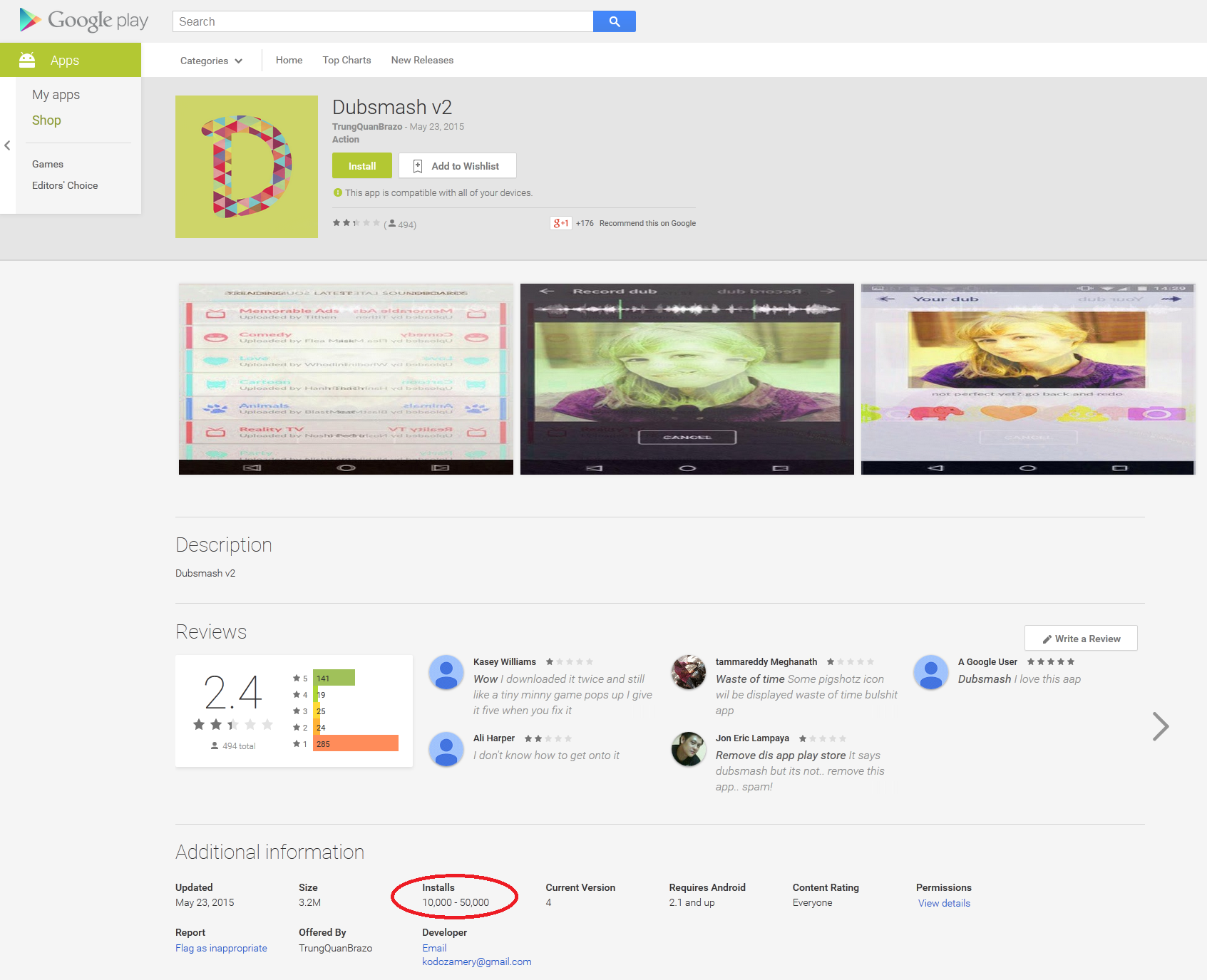
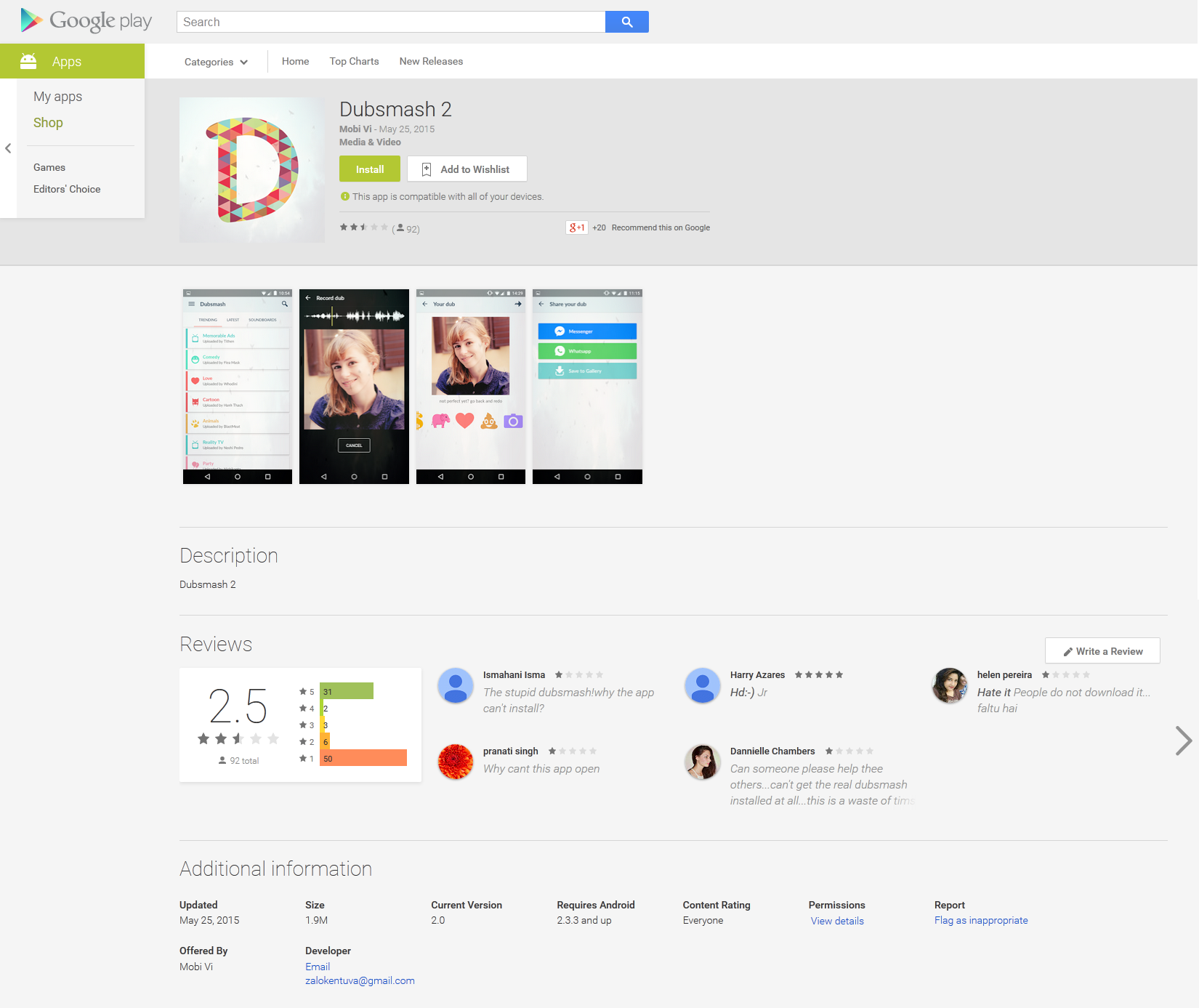
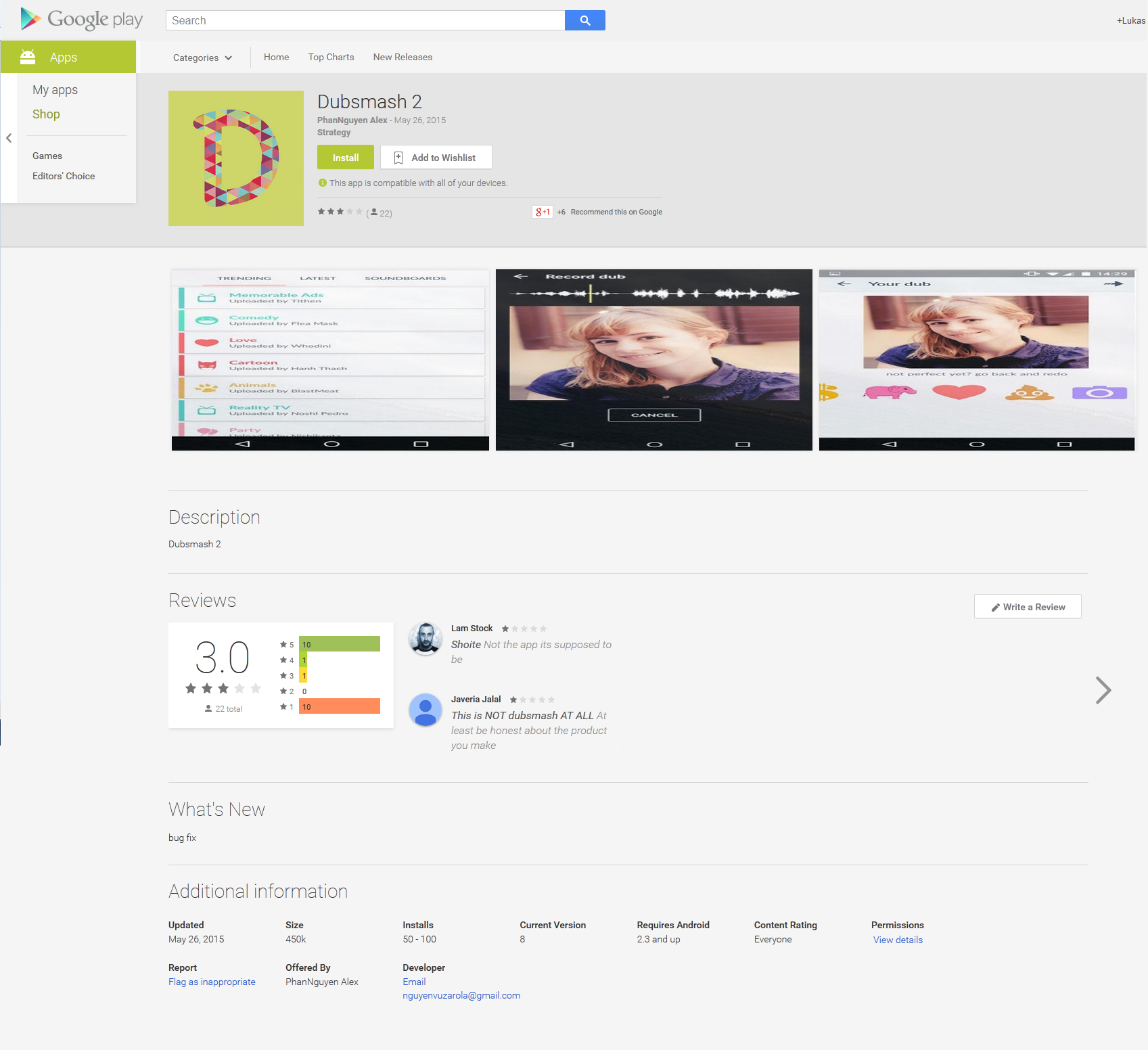
The author of the malware didn’t wait too long before uploading another version of the porn clicker to Google Play on May 23, 2015, passed off as Dubsmash v2. After three days the application had been downloaded more than ten of thousands of times. On May 25, 2015 and on May 26 2015 Dubsmash 2 was uploaded to the Play Store for the fourth and fifth time with the same malicious code implemented. It’s very rare for malware to be uploaded to official Play Store with the same functionality so many times over such a short period.
dubsmashv2Top_1
Figure 2 Fake Dubsmash v2 – May 23
Figure 3 Fake Dubsmash 2 – May 25
Figure 4 Fake Dubsmash 2 – May 26
ESET security software detects this threat as Android/Clicker Trojan. The fake applications were quickly removed from Play Store after we notified Google.
Figure 5 Android/Clicker Trojan removed from Google Play
After further research we discovered that these four applications were not the only Dubsmash 2 applications uploaded to the Google Play Store. We found another four applications that were removed from the Play Store in the past. ESET identified nine Trojan Clicker applications altogether that were made available for download, disguised as fake Dubsmash 2 applications.
Figure 6 Other Dubsmash 2 variants

Analysis

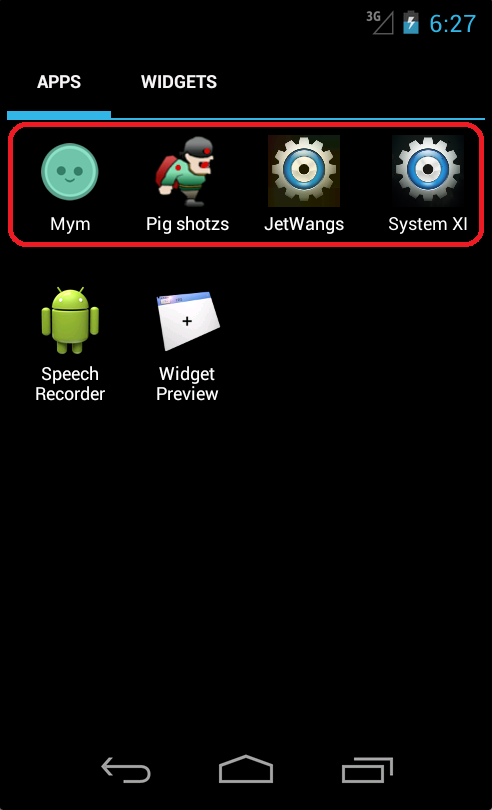
After installation, the user will not find any new Dubsmash icon on the device. The newly installed app’s icon or name has nothing in common with the real Dubsmash application. Mostly it pretends to be a simple arcade game or system application. After startup, the application hide its launching icon, but it is still constantly running in the background, accessing porn pages to generate revenue via click fraud.
Figure 7 Dubsmash 2 icons
Malicious activity is triggered when the device changes its connection. It’s not difficult to get the server URL address, as the app developer did not encrypt URLs this time. The server URL can be found in the code in plaintext. But there is one interesting change from the last version. Malicious code will not be executed if anti-virus software is installed on the device. The Trojan checks installed applications, based on package names, against the names of 16 anti-virus vendors. Package names are dynamically requested from server over HTTP. Package names can be easily updated to add other anti-malware applications. When the Trojan is installed it may not yet be detected by all AV solutions, but in many cases AV vendors can block URLs on request if they are found to be malicious. In one case the Trojan uses the server to communicate with as in its earlier version. It’s very suspicious when the user is warned that his device is trying to request data from a server that has already been blocked. At this point, the user may be alarmed to find that something suspicious is going on.
Package Name
com.eset.ems2.gp
com.kms.free
com.avast.android.mobilesecurity
com.symantec.mobilesecurity
com.antivirus
com.drweb
com.cleanmaster.mguard
com.cleanmaster.security
com.avira.android
com.wsandroid.suite
com.drweb.pro
org.antivirus
com.s.antivirus
jp.naver.lineantivirus.android
org.antivirus.tablet
org.antivirus.tcl.plugin.trial_to_pro
If none of these applications are installed then Dubsmash 2’s true functionality is initiated. The Trojan will demand porn links from its server. These links will be loaded every 60 seconds into WebView inside an invisible window, with a random clicking pattern applied.

Conclusion

It looks as if the official Play Store has still some weak spots, given that the same malicious applications were uploaded and offered to more than ten of thousands of users for the fourth time in just a month. The developer misused the name of a popular, for his own financial gain. We advise users to read reviews even when the application is not requesting any harmful or suspicious permissions.

More information

Package name
MD5
ESET Detection name
com.mym.gmsBC72AD89E02C5FAA8FD84EBE9BF9E867Android/Clicker.M
com.jet.war8788B7C60BC9021A5F6162014D7BD1A6Android/Clicker.L
com.lh.screensA2CCD03A1997F86FB06BD1B21556C30FAndroid/Clicker.M
com.jet.sman6E20146EB52AEA41DB458F494C3ED3E6Android/Clicker.J
Author Lukas Stefanko, ESET

ที่มา :www.welivesecurity.com

7/12/2558

Apps on Google Play Steal Facebook Credentials

ในการทดสอบผ่าน Virustotal นั้นไฟล์ผ่านการตรวจสอบไม่ฟ้องว่าเป็น malware ในช่วงแรก

ESET ตรวจพบคือ Android/Spy.Feabme.A
ซึ่ง trojan จะหลอกให้ผู้ติดตั้ังเกมส์ ใส่ user และ password ใน Facebook login ปลอม เพื่อขโมยรหัสและข้อมูลส่วนตัว และยังส่ง spam ไปหาเพื่อน เพื่อเป็นการกระจายการ download และเพิ่มจำนวนผู้ติดเชื้อ

http://virusradar.com/en/Android_Spy.Feabme.A/description

รายละเอียดเชิงลึก
http://blog.trustlook.com/2015/07/08/most-successful-malware-on-google-play/

  *********************************************************************

Apps on Google Play Steal Facebook Credentials


Over 500,000 Android users targeted by phishing apps harvesting their Facebook credentials. ESET detects these trojans as Android/Spy.Feabme.A
Malware Analysis by: Lukáš Štefanko
With 500,000 – 1,000,000 installs, Cowboy Adventure was a relatively popular game on the Google Play store. That popularity in itself is unremarkable: however, the developers of the app also used it as a tool to harvest Facebook credentials, and that did raise a few eyebrows. It was one of two games spotted by ESET malware researchers that contained this malicious functionality, the other one being Jump Chess.
1_ 11_
Unlike some other Android malware, these apps did contain legitimate functionality (they actually were real games) in addition to the fraud. The problem lies in the fact that when the app is launched, a fake Facebook login window is displayed to the user. If victims fell for the scam, their Facebook credentials would be sent to the attackers’ server.
apps-google-play-facebook-credentials-cowboy-adventure-ESET-3 copy
That was the bad news. The latest version of Cowboy Adventure at the time Google took it down from their official market last week was 1.3. This trojanized game had been available for download from Google Play since at least April 16, 2015, when the app was updated. We are not sure how many users had their Facebook credentials compromised.
Jump Chess – from the same developer – had been available for download since April 14, 2015, but fortunately it was less successful than Cowboy Adventure, with only 1,000 – 5,000 installs.
The good news is that Google has taken down both of the apps from their app store and also warns against their installation on Android devices:
gp1
Google’s security mechanisms have been improving, which has lowered the risk of getting infected by malware for Android users.
Another piece of good news is that even though the number of potential victims may have been up to one million, there were many of them who were not tricked by the scam. They expressed their negative opinions in the user comments for the app:
2__
Our analysis of these malicious games has shown that the applications were written in C# using the Mono Framework. The phishing code is located inside TinkerAccountLibrary.dll. The app communicates with its C&C server through HTTPS and the address to which to send the harvested credentials (also known as the ‘drop zone’) is loaded from the server dynamically.
This example of Android malware reminds us of a few basic principles that help us to stay safe when using Google’s mobile platform:
  • Always favor downloading apps from the official Google Play store rather than from alternative app stores or other unknown sources. Even though Google Play is not 100% malware free, they do have strong security mechanisms to keep trojans out.
  • Download apps only from trustworthy app developers and always check the ratings and user comments. The scam behavior of Cowboy Adventure was quickly noticed by users. Also take a minute to review the permissions that an app is asking for during installation.
  • Don’t underestimate the necessity for an anti-malware scanner on your Android phone. ESET Mobile Security detects the malicious games as Android/Spy.Feabme.A.
UPDATE: After proofing, as this article was on its way to press, we discovered that Trustlook also published their analysis of this trojan yesterday. Check out their blog post for interesting additional technical details.
Author Robert Lipovsky, ESET

7/11/2558

MD5 65520ecd513c8b8b75f601aa2e69aeef

786.exe
MD5 65520ecd513c8b8b75f601aa2e69aeef
SHA1 de578fc65612c70e409a98da4d4a48a043773a66
SHA256 7c2f1a1da77b556536c92fd4234e9d9dcd3e2edd86e1fe0a5aa950f6c8211c3e
Antivirus Result Update
ALYac Trojan.GenericKD.2523042 20150710
AVG Generic_r.FJK 20150710
AVware Trojan.Win32.Generic!BT 20150710
Ad-Aware Trojan.GenericKD.2523042 20150710
Agnitum Worm.Cridex!U+knGW1DKWA 20150709
AhnLab-V3 Worm/Win32.Cridex 20150709
Arcabit Trojan.Generic.D267FA2 20150710
Avast Win32:Malware-gen 20150710
Avira TR/Agent.102400.525 20150710
Baidu-International Worm.Win32.Cridex.qro 20150710
BitDefender Trojan.GenericKD.2523042 20150710
Bkav HW32.Packed.CB36 20150708
CAT-QuickHeal WormAPT.Cridex.r4 20150710
Cyren W32/Dridex.ZLBU-4084 20150710
DrWeb Trojan.Dridex.139 20150710
ESET-NOD32 a variant of Win32/Kryptik.DNXD 20150710
Emsisoft Trojan.Win32.Agent (A) 20150710
F-Prot W32/Dridex.CZ 20150710
F-Secure Trojan.GenericKD.2523042 20150710
Fortinet W32/Cridex.QRO!worm 20150710
GData Trojan.GenericKD.2523042 20150710
Ikarus Trojan.Win32.Crypt 20150710
K7AntiVirus Trojan ( 004c730a1 ) 20150710
K7GW Trojan ( 004c730a1 ) 20150710
Kaspersky Worm.Win32.Cridex.qro 20150710
Malwarebytes Backdoor.Bot 20150710
McAfee Generic.xb 20150710
McAfee-GW-Edition Generic.xb 20150710
MicroWorld-eScan Trojan.GenericKD.2523042 20150710
Microsoft Backdoor:Win32/Drixed 20150710
NANO-Antivirus Trojan.Win32.Cridex.dtknzj 20150710
Panda Trj/Chgt.O 20150709
Qihoo-360 HEUR/QVM07.1.Malware.Gen 20150710
Rising PE:Malware.XPACK-HIE/Heur!1.9C48 20150709
Sophos Troj/Agent-ANWH 20150710
Symantec Downloader 20150710
Tencent Win32.Worm.Cridex.Wnmg 20150710
TrendMicro TSPY_DRIDEX.CC 20150710
TrendMicro-HouseCall TSPY_DRIDEX.CC 20150710
VBA32 Worm.Cridex 20150710
VIPRE Trojan.Win32.Generic!BT 20150710
ViRobot Trojan.Win32.S.Agent.102400.CEE[h] 20150710
Zillya Worm.Cridex.Win32.745 20150710
nProtect Worm/W32.Cridex.102400.C 20150710
AegisLab
20150710
Alibaba
20150710
Antiy-AVL
20150710
ByteHero
20150710
ClamAV
20150710
Comodo
20150710
Jiangmin
20150709
Kingsoft
20150710
SUPERAntiSpyware
20150710
TheHacker
20150709
TotalDefense
20150709
Zoner
20150710

7/10/2558

Malware Remove Tool and Utilities Tool

#Malware Remove Tool#

Process and Task Manager Tool


1. ExplorerXP Download link 1 hot ! 

2. Process Explorer Download link 1 Download link 2 hot ! 
3. Security Task Manager Download link 1 hot !
4. CurrProcess Download link 1 hot !
5.
IBProcess Manager Download link 1 Download link 2
6.
KillProcess Download link 1 Download link 2
7.
ProcessQuickLink Download link 1
8. Security Process Explorer Download link 1
hot !
9. Precess viewer Download link 1 Download link 2 Hot !
10.What’s Running Download link 1
11.Ultimate Process Manager Download link 1 Download link 2
12.Bill2’s Process Manager Download link 1 Download link 2
13.DTaskManager Download link 1 Download link 2
hot !
14.FileASSASSIN Download link 1
15.KillBox Download link 1
16.The Ultimate Troubleshooter Download link 1
17.Process Group Killer Download link 1 Download link 2
18.ATool Download link 1 Download link 2
19.iKnow Process Scanner Download 1 Download link 2
20.AnVirTaskManager Download link 1
21.Autoruns for Windows (sysinternal) Download link 1 hot !
22.Process Monitor (sysinternal) Download link 1
23.Free Extended Task Manager Download link 1
24.CS Fire Monitor Download link 1 Help file
25. Process Lasso Download link 1
26.System Eyes & Ears Monitor Download link 1 Download link 2
27.RootKit Unhooker Download link 1
28.ProcessX Download link 1 hot !
29.Process Hacker Download link Download link 2

30. a-squared HiJack Download link1
31. PCAnalyzer Download link1
32. System Explorer Download link , Download link2 (New ) hot !
33. gmer Download link
34. Windows Process Viewer Download link
35. RKill ,eXplorer,iExplore,uSeRiNiT,WiNlOgOn Download link

Registry Tool
1. RegEditX Download link 1 Hot !
2. Vilma Registry Explorer Download link 1 Download link 2
hot !
3. Registry Workshop Download link 1 Download link 2
4. RegWork Download link 1
5. RegASSASSIN Download link 1 Download link 2 hot !
6. Registry Finder Download link 1
7. RegSeeker Download link 1 Download link 2 Download link 3
8. Registry Crawler (Portable) Dowmload link 1 (Cancel)
9.Disk and Registry Alert Download link 1 Download link 2

10. Sentinel Download link 1
11. Registry Explorer Download link 1
12. UnhookRegKey Download link1 hot !
13. Registry Backup Download link

Repair and Fix Tool
1. Hijack This : Download link 1 Download link 2 hot !
2. NOD32 Recovery Tool Download link 1 hot !
3. CPE17 Downlink link download link 2
hot !
4. USB disk Security Download link1 Downlink 2 hot !
5. Re-Enable Download link hot !
6. NTREGOPT Download link
Other Tool
1.TCP View (Sysinternal) Download link 1
2. TCP Monitor Download link 1
3. HashCalc Download link 1
4. MD5 Tool Download link 1 

5. MD5 Checker Download link 1
6. Unlocker Download link 1
hot !
7. Febooti fileTweak Hash & CRC Download link 1
8. Netstat viewer Download link 1
9. Advanced CheckSum Verifier Download link 1
10.Active Port Download link 1
11.Hermetic File Monitor Download link 1
12. Explorestart Download link 1 Download link 2 hot!
13.MD5Sums Download link 1
14. Startup gaurd Download link 1
15. Resource Hacker Download link 1
16. RemoveOnBoot Download link 1 hot !
17. DKDC Hash Download link1 hot !
18. HASH TAB 3.0 Download link1 Download link2
19. Everything Download link hot !
20. HostExpert Download link hot !
21. Hostperm Download link
22. iReset Download link
23. SvchostAnalyzer Download link
24. UnlockIEhp Download link
25. Virus Total Uploader Download link
26. sysAnalyzer Download link
27. Malcode Analyst Pack Download link
28. HookExplorer Download link
29. Multipot Download link
30. FileDissect Download link
31. JPExPoc Download link
32. PUNKui Download link
33. Attack Vector Test Platform Download link
34. iDBG Download link
35.OllyDBG heap VIS Download link
36. DLtrace Download link
37. Hex-Rays superfluous local variable plug-in Download link
38. IDA Function Analyzer Download link
39. Codis Download link
40. IDACompare Download link
41. IDA Sync Download link
42. IDA pGRAPH Download link
43. Show Hidden Download link
44. XPQuickFixPlus Download link 
45. VT Hash Check Download link 
46. GrantPerms Download link 
47. FixExec Download link 
48. DDS Download link 
49. Unhide download link
=================================
Anti RootKit link (Credit : antirootkit.com)
=================================
8. Gmer
26. SEEM
30. Unhackme
31. Zeppoo
32. Malwarebyte Anti Rootkit
33. Avast AswMBR 
 
=================================
Rootkit Prevention Tool
=================================
 

1. AntiHook

=================================
Crypto Fighter Tool (Ransomware)
=================================


Kaspersky
Web Kaspersky Decryptor ransomware Hot !
kaspersky-coinvault-decryptor 
RakniDecryptor
RakhniDecryptor(Doc)
RannohDecryptor
Xoristdecryptor
Xoristdecryptor(Doc)
Rectordecryptor
ZbotKiller
TDSS Killer

(CryptoLocker started with infections from the ZeuS or Zbot banking Trojan and is being circulated via botnets to download and install CryptoLocker.)

Other Tool , Decrypt and Prevention
Bitdefender AntiCryptoLocker Hot !
Panda Ransomware Decrypt

Cisco TelsaDecrypt TelsaCrypto
Nabz Decrypt Bit Crypto
emsissoft Decrypt Cryptodefense
og3patcher Decrypt Operation global III
emsi decrypt PCLock
TorrentUnlocker Decrypt TorrentLocker (DecrypterFixer : Nathan Scott)Hot !
Locker UnLocker (DecrypterFixer : Nathan Scott) Hot !
Anti-CryptoBit V2(Bleeping computer) Hot !
Decrypt_mblblock Decrypt Protect
ProtecMyTool
FoolishIT Crypto Prevent Hot !

HitmanPro
HitManPro with Kickstart
HitManPro.Alert CrytoGuard Hot !
CryptoLockerTipwire 
Eventsentry Download
Enhanced Mitigation Experience Toolkit (EMET)
Crypto Prevention ToolKit
ShadowExplorer Hot !
CryptoMornitor  Hot !
SafeGuard LAN Crypt


Repair Corrupt file ด้วย File Repair
ซ่อมไฟล์กรณีใช้โปรแกรม Decrypt ไฟล์ได้แล้วแต่เปิดไม่ได้ 
(บางไฟล์อาจซ่อมไม่ได้ จากที่เคยได้ทดสอบ หลังจากใช้โปรแกรม Drcrypt แล้ว)

File Repair  


=================================
Download Tool From Bleepingcomputer
=================================

http://www.bleepingcomputer.com/download/combofix/
http://www.bleepingcomputer.com/download/zemana-anti-malware/
http://www.bleepingcomputer.com/download/emsisoft-antimalware/
http://www.bleepingcomputer.com/download/superantispyware/
http://www.bleepingcomputer.com/download/hitmanpro/
http://www.bleepingcomputer.com/download/adwcleaner/
http://www.bleepingcomputer.com/download/junkware-removal-tool/
http://www.bleepingcomputer.com/download/roguekiller/ (By Tigzy)
http://www.bleepingcomputer.com/download/tweakingcom-technicians-toolbox/
http://www.bleepingcomputer.com/download/delfix/
http://www.bleepingcomputer.com/download/heimdal-free/
http://www.bleepingcomputer.com/download/glasswire/
http://www.bleepingcomputer.com/download/givemepower/ (ใช้อย่างระมัดระวัง)
http://www.bleepingcomputer.com/download/windows-repair-all-in-one/
http://downloads.solarwinds.com/solarwinds/Release/FreeTool/SolarWinds-RealtimeNetFlowAnalyzer.zip
http://www.bleepingcomputer.com/download/blitzblank/
http://www.bleepingcomputer.com/download/otl/
http://www.bleepingcomputer.com/download/hosts-permbat/
http://www.bleepingcomputer.com/download/minitoolbox/

Information

==============================================
PeeTechFix >> JupiterFix
==============================================
Photobucket

วิธีใช้งาน : JupiterFix-Win32.PSW.OnlineGames
ท่านสามารถตรวจสอบรายชื่อ Virus ที่โปรแกรม สามารถ Clean ได้ ใน VirusList.txt
-------------------------------------------------------------------------------------
ท่านใดที่ Download PeeTechFix tool ไปใช้แล้วมีปัญหาหรือลบไม่ออก โปรดแจ้งปัญหา ที่ email : MalwareHunter.info@gmail.com ด้วยครับ หรือส่งไฟล์ virus ให้ด้วย จะขอบพระคุณอย่างยิ่ง
-------------------------------------------------------------------------------------
Safemode Recovery (.reg) แก้ปัญหา Virus ลบ Key Safeboot แล้วเข้า safemode ไม่ได้
------------------------------------------------------------------------------------
วิธีแก้ Error message (แก้อาการเปิดไฟล์ .exe ใน USB Drive ไม่ได้)
"Windows cannot open this program because it has been prevented by a software restriction policy. For more information, open Event Viewer or contact your system administrator"
วิธีแก้ ดูที่ link นี้ครับ
-------------------------------------------------------------------------------------
วิธีแก้ MSN /Windows Live Messenger Disconnect (จาก virus OnlineGames)
-------------------------------------------------------------------------------------
How to start Windows in Safe Mode

Popular Posts