"Malware Fix รวมวิธีแก้ปัญหา virus computer โครงการทำดีเพื่อสังคม" "ต้องขออภัยผู้เยี่ยมชมทุกท่านนะครับ ที่เ้ข้ามาแล้ว ไม่ค่อยได้มีการ update หรือทดสอบ virus ตัวใหม่ๆ เนื่องจากภาระหน้าที่การงาน"

Alert


Photobucket
แจ้งเตือนภัย ! Crypt0L0cker (Ransomware)
เข้ารหัสข้อมูลใน คอมพิวเตอร์ กำลังระบาดในไทย
และกำลังระบาดหนักในเกาหลี
ThaiCERT , Crytpo Prevention Tool

*ห้ามจ่ายเงินโดยเด็ดขาด เพราะจะเสียทั่้งเงินและกู้ข้อมูลไม่ได้
รบกวนคนที่เข้ามาอ่านช่วยแชร์ด้วยนะครับ
How to remove Crypt0L0cker
แสดงบทความที่มีป้ายกำกับ NEWS แสดงบทความทั้งหมด

7/24/2558

Porn clicker keeps infecting apps on Google Play


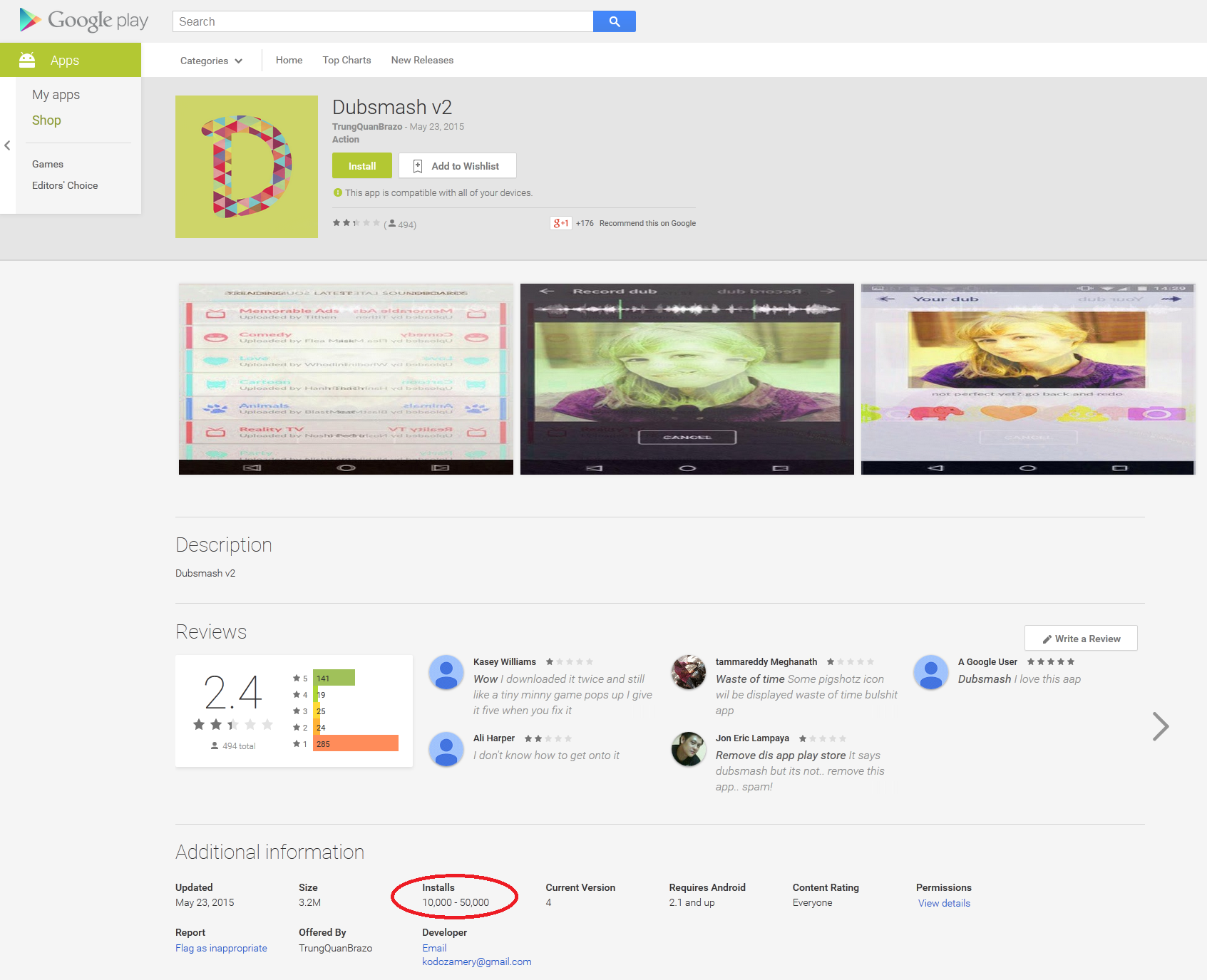
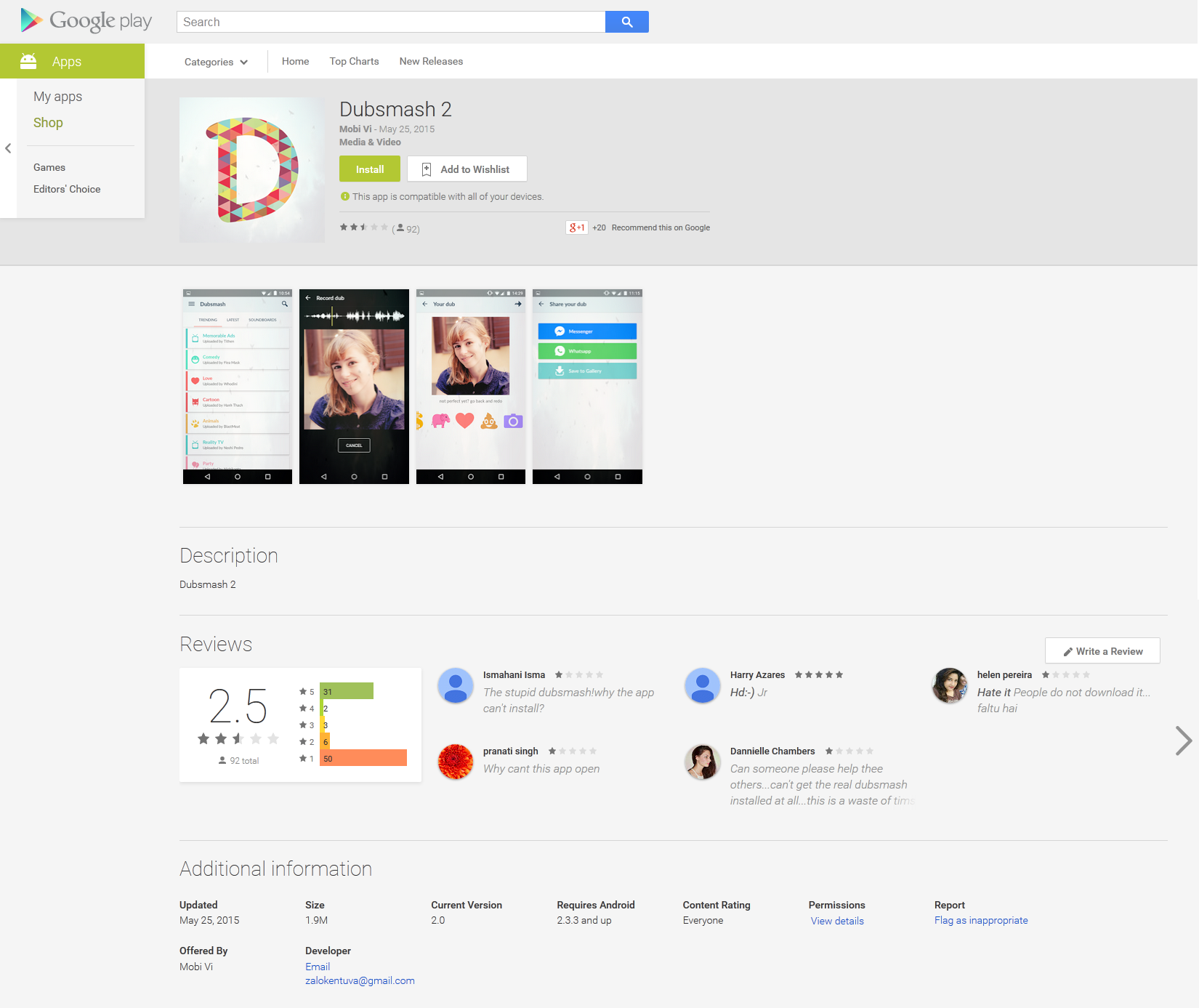
Lately we informed you how a fake Dubsmash application has been uploaded to Google Play Store at least nine times, which have tens of thousands of installs. This porn clicker Trojan, which we detect as Android/Clicker, has once more become available for download from Play Store. After we notified Google and published an article about these fake Dubsmash Trojans, we discovered other fake Dubsmash versions being uploaded again infected with the same porn clicker. We detected yet another 51 Trojan porn clickers accessible for the users to download. Four of them had more than 10,000 installs and one of them had more than 50,000 installs.
This 51 together with 9 fake Dubsmash we reported in the previous article users were able to download 60 different Trojan clicker applications from Google Play. These Trojan clickers were downloaded at least 210,000 times in the last three months. In the weeks after our article was published, these apps were installed more than 106,000 times.
This time not only were fake versions of Dubsmash uploaded by the same developer, we also found Download Manager, Pou 2, Clash of Clans 2, Subway surfers 2, Subway surfers 3, Minecraft 3, Hay Day 2, various game cheats and Video Downloaders being infected with the same Trojan Clicker.
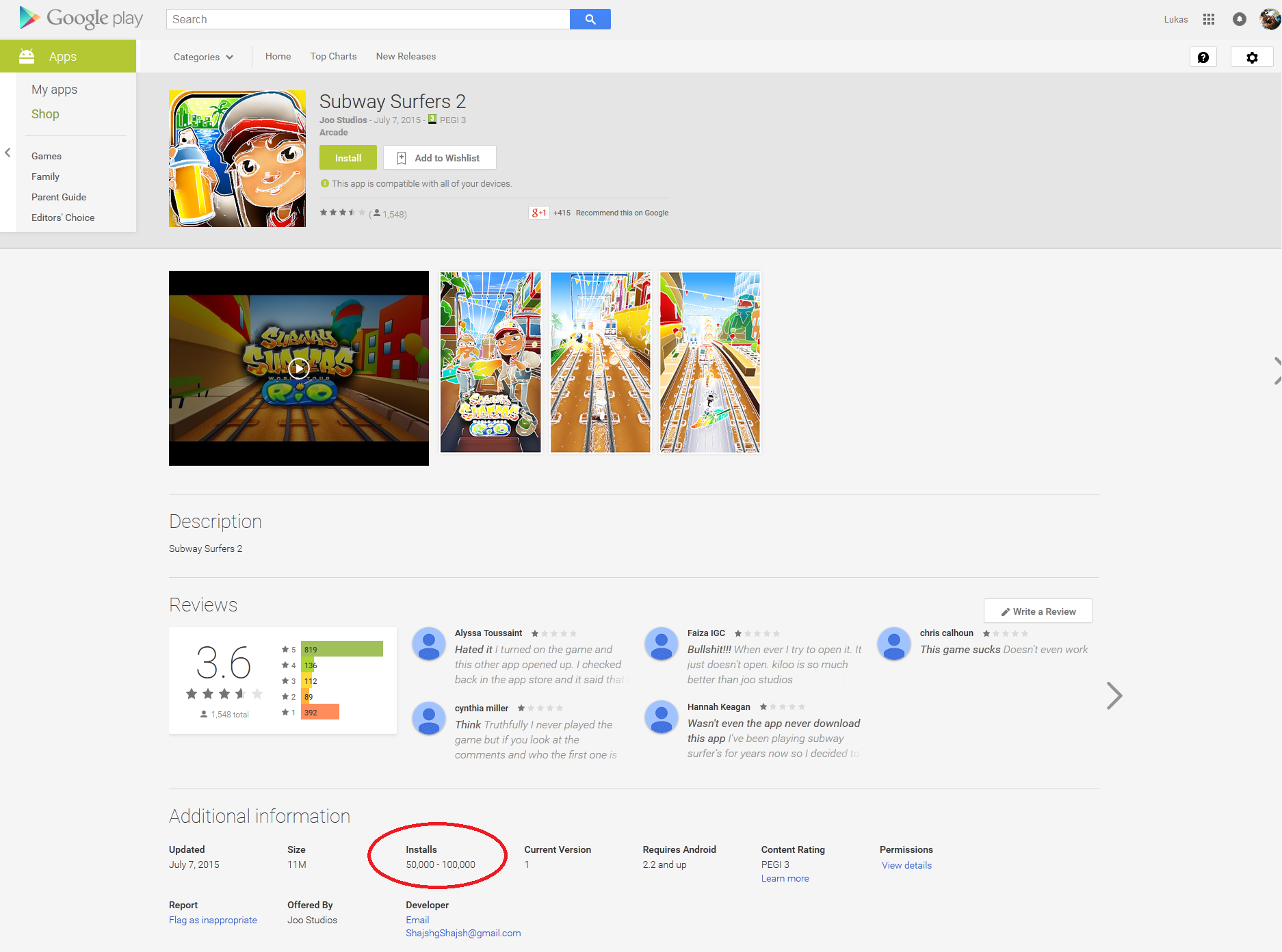
Figure 1 Fake Subway Surfers 2
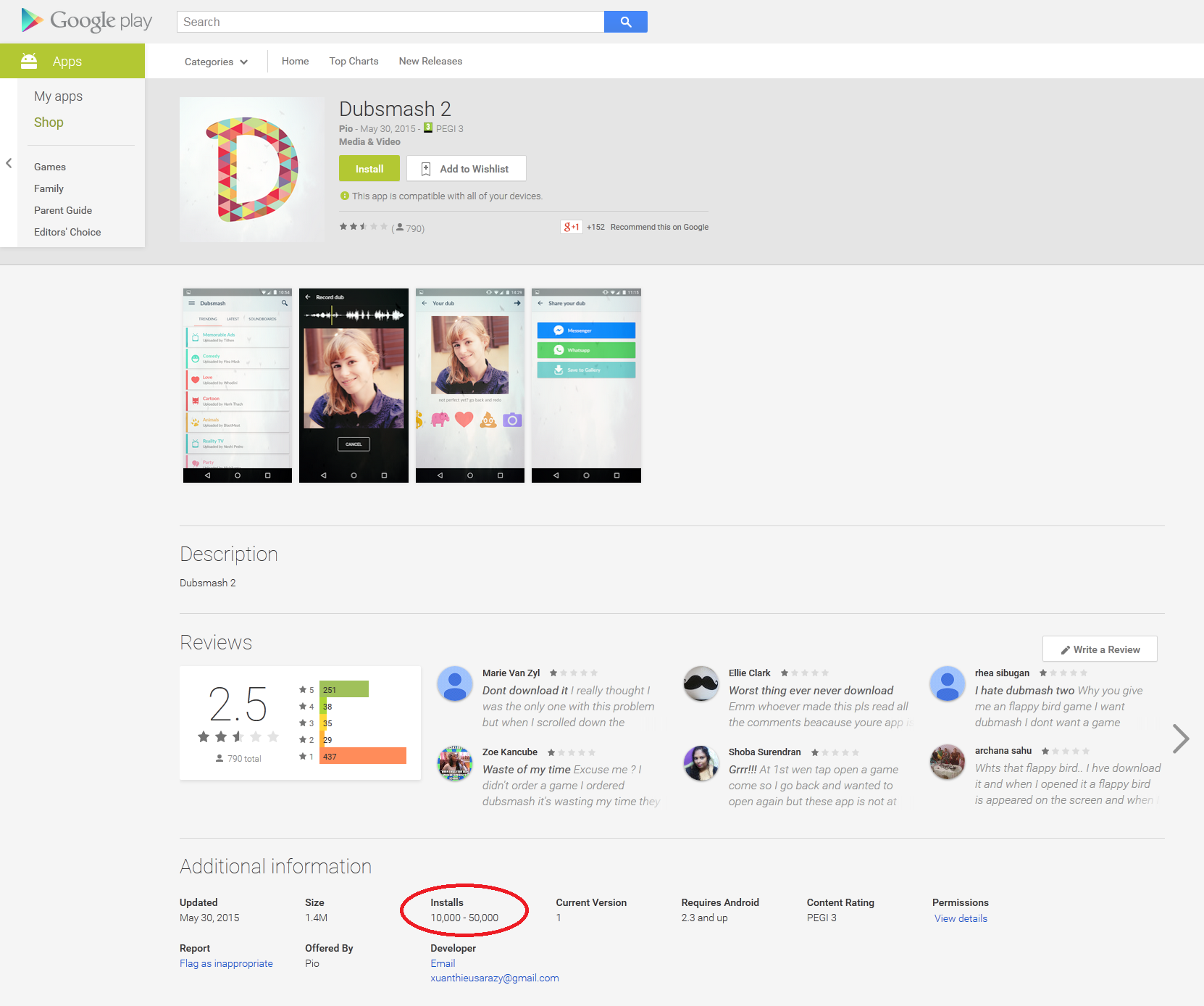
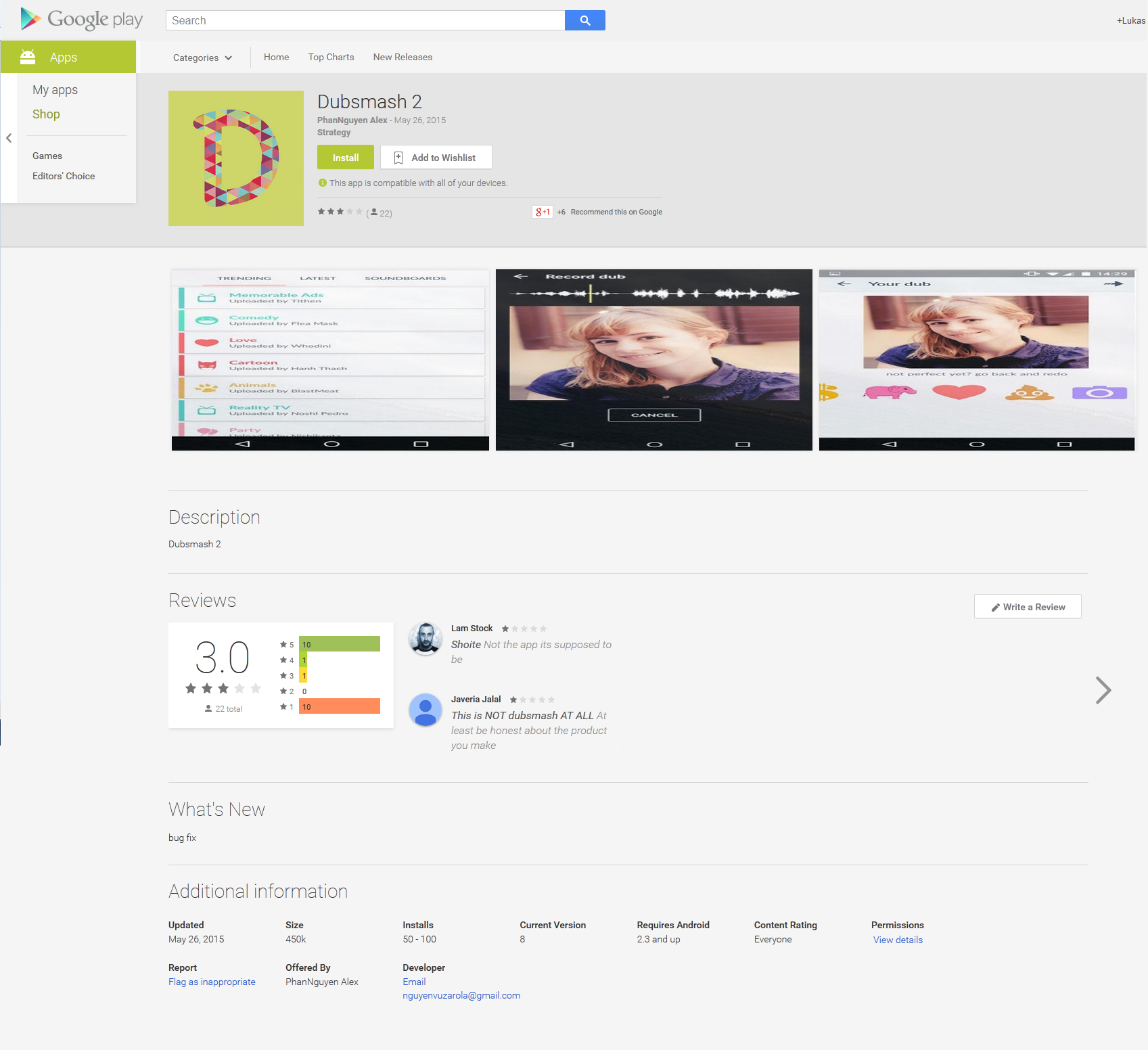
Figure 2 Fake Dubsmash 2
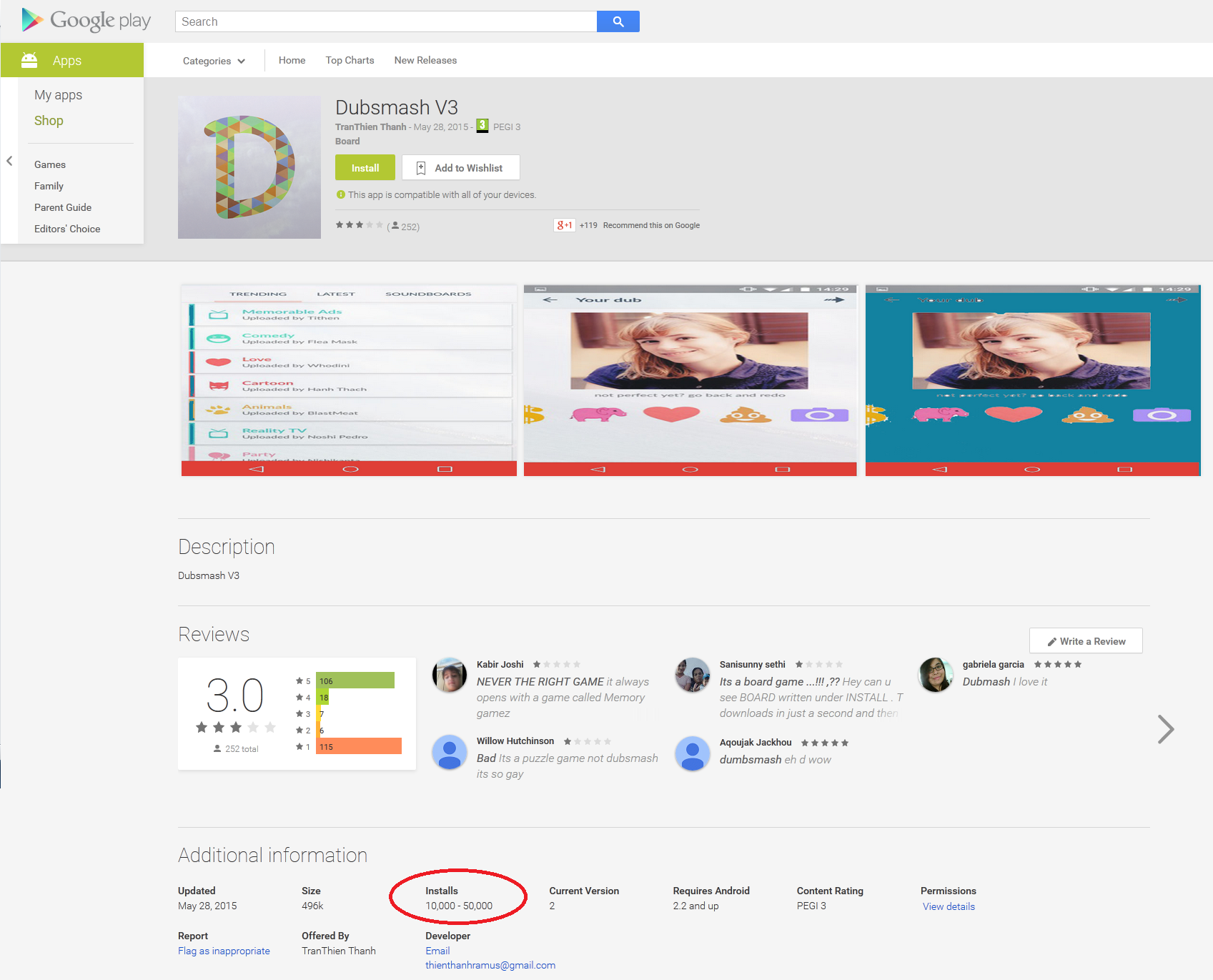
Figure 3 Fake Dubsmash V3

ESET is still seeing occurrences of this infiltration on Google Play and, after more than a month, these fake Trojan Clickers are still managing to evade Google’s Bouncer malware filter and potentially exposing millions of users to risk.
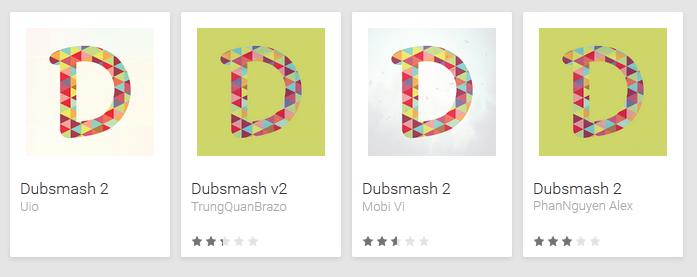
Figure 4 Porn clicker apps from Google Play

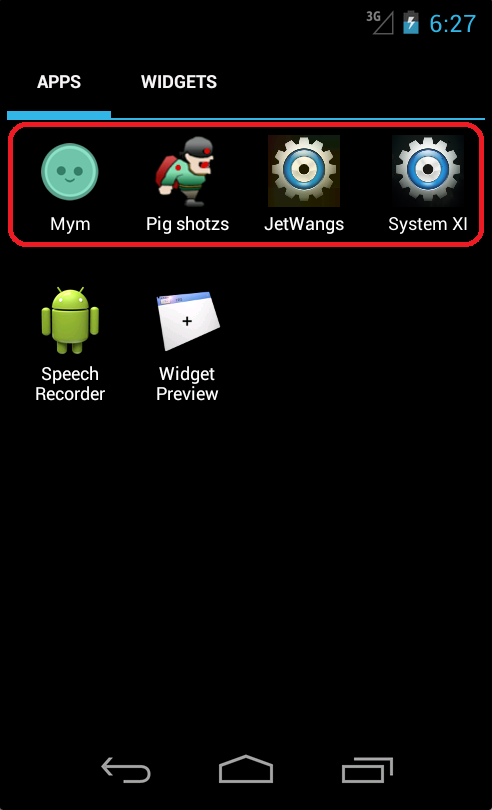
Interestingly, none of the fake applications will add a Dubsmash app icon to the app menu after installation. Instead the malicious apps pretend to be arcade games like Flappy Birds Family, board games or system applications.
Figure 5 Examples of Trojan app icons

Following ESET’s notification, Google has pulled the malware from the Play Store and also reports some of them as potentially harmful applications using its built-in security service.
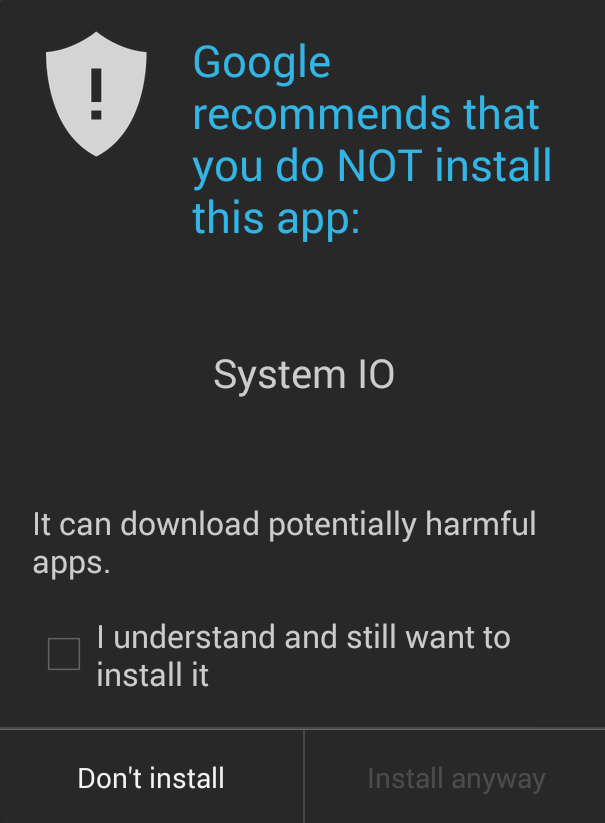
Figure 6 Google security service notification of potentially harmful app

Conclusion

Even though the malicious applications were available for download for at most a week, tens of thousands of people still installed them. Hopefully, Google is doing its best to fix this issue and find a way to prevent the developers of these porn clickers from publishing them to the Play Store. To reduce the risk from malicious apps that may have slipped through Google’s filtering, we advise Play Store customers to take careful note of reviews by other customers, and to ensure that their security software is kept up to date.

More information

App Name
Uploaded
Installs
Dubsmash 227 May 20150 - 10
Dubsmash V328 May 201510,000 – 50,000
Dubsmash 230 May 201510,000 – 50,000
Dubsmash 22 June 20150 - 10
Dubsmash 24 June 20150 - 10
Dubsmash 39 June 20150 - 10
Download Manager9 June 20150 - 10
Dubsmash 210 June 20150 - 10
Poo Video Downloader13 June 20150 - 10
Dubsmash 214 June 201510 - 50
Dubsmash 217 June 201510,000 – 50,000
Dubsmash 319 June 20151,000 – 5,000
Dubsmash 220 June 201510 - 50
Best : Dubsmash 3!1 July 20150 - 10
Komboatic1 July 20150 - 10
Best : Dubsmash4 July 201510,000 - 50,000
C l a s h o f C l a n s 24 July 2015100 - 500
Cheats for Clash of Clans6 July 20155,000 - 10,000
Dubs Mash 26 July 20151,000 - 5,000
Cheats & Trucos: Gta 56 July 201510 – 50
Maps & Guide: GTA 56 July 2015100 – 500
Subway Surfers 27 July 201550,000 – 100,000
Best : Dubsmash7 July 20151,000 – 5,000
Clash of Clans 28 July 20150 - 10
Pou 28 July 20155,000 - 10,000
Subway Surfers 38 July 20151,000 - 5,000
Followers for Instagram8 July 201510 - 50
MayHayda8 July 2015500 - 1,000
MayHada8 July 2015500 - 1,000
Man Kaptasi8 July 2015100 - 500
Smash Hit 29 July 2015500 – 1,000
Miviki yanki10 July 20151,000 – 5,000
Flipagram 210 July 2015100 – 500
Koday10 July 20150 - 10
Deer Hunter 201510 July 20150 - 10
Minecraft 313 July 20150 - 10
Red Ball 613 July 201550 - 100
Archery Master 413 July 20150 - 10
Exploration Lite 214 July 2015100 - 500
Traffic Racer 214 July 201550 - 100
Hitman Sniper 214 July 201550 - 100
Batman 214 July 201510 - 50
The Walking Dead 214 July 20150 - 10
Moto Loko 214 July 20150 - 10
Rally Racer 214 July 20150 - 10
Dr Driving 214 July 2015100 - 500
Survivor Heroes 215 July 20150 - 10
Dubsmash 215 July 201510 – 50
Hay Day 215 July 20150 -10
Subway Surfers 219 July 201510 - 50
Dubsmash 219 July 201510 - 50
Package Name
MD5
ESET Detection name
com.chbded.chs73DB1E459DA78A7C831209B687B6C12FAndroid/Clicker.M
com.jet.cleandub9334DAD2F7C9422E0D1C740D646C19DBAndroid/Clicker.J
com.jet.dubsh48A4BE6A7A6CBAB9C4A674F99E5158AAAndroid/Clicker.J
com.memr.gamessAC8D9DEEE2B07EF3A7C5BD2FC01560F1Android/Clicker.M
com.androsadfg.downloadmanager6CACBDD667504DC564050D5DD5CF683BAndroid/Clicker.M
com.jet.ayak28C5A7E4FC2E7CD446E03A88939596FDAndroid/Clicker.P
com.wngrd.mp3remote093412BCA7984039F5369DE6308D4C47Android/Clicker.M
com.jet.shdub11D32B18A096AE2D0F3D054BA0131492Android/Clicker.J
com.poo.downloaderB85EEF771BE83A33E233A8CA587C9B9DAndroid/Clicker.P
com.poo.db88C8F6715D5466DA7C1EB7DBAB7584A8Android/Clicker.P
com.poo.smm13AFF08E4733C953BC7DE6A5D7C02FD2Android/Clicker.P
com.huynoibomira.boboA845279F215ED6966B45D64E3369A1F2Android/Clicker.M
com.ti.basegam656E573C1277EE6607A0403CAA02AE25Android/Clicker.M
com.biz2048.yilinda331C93AFACD1433A2ECD7E5E7AEE9ADFAndroid/Clicker.M
com.rikona.sa390AE01ED49CBBE14EA91F347E806D8FAndroid/Clicker.M
com.kankalar.cheats167ABC463BC9C7A2D1EDC0E383806499Android/Clicker.M
com.kankalar.clash2F297E5A18A4025ECB0F34C8BF905B3F1Android/Clicker.M
com.kankalar.elma5AF9E1DE3D1D19DACB1AA98288E1CA25Android/Clicker.M
com.sulale.chetastga08B320694B898B0F6402FA8B45D301F8Android/Clicker.M
com.sulale.cimmi249A0660F18C53D91B58A680D78E9EC4Android/Clicker.M
com.sulale.dubbD11BB0B91595E6B6DE89FB7BF2C92F83Android/Clicker.M
com.poo.cofc4FBC4AB39C704088902A6C114A44F0F3Android/Clicker.Q
com.poo.po98961261BC663F4D3E6F073CE6575A48Android/Clicker.Q
com.poo.way3E62E455A15D99762198F8C5779F81AFAndroid/Clicker.Q
com.poo.xDC78620AA75EDBB846776760A88AE17AAndroid/Clicker.Q
com.nguyenngocjumraze.suuu21679FE29217DB6925B17CC4BF1FCE9BAndroid/Clicker.M
com.nguyenngocjumraze.takip3FD37BB6250F08A58C8932C630F57C4CAndroid/Clicker.M
com.fet.hiye47BE311A6CDA5B4981DB282CA1884BC9Android/Clicker.M
com.kendo.yakoB0345E9392F2C79D2403B18FB7FFD419Android/Clicker.M
com.nhantieplosengazi.flip44D7A2E9B3D106C4D41311E23350A813Android/Clicker.M
com.nhantieplosengazi.kivi189E5E23A99AF963DBFD70FD9552661EAndroid/Clicker.M
com.phutanjocohare.concCB6A3918CFFA7BEEF2EAD6E5C60F2A3EAndroid/Clicker.M
com.phutanjocohare.jat647987E48CF037E57CEEC6CB282F8124Android/Clicker.M
com.phutanjocohare.may9E4B0ADC7B4CF2353859EADBB928C688Android/Clicker.M
com.pupa.yelken5B35B0D5E04F9CDCFFF66D376805ADDFAndroid/Clicker.M
com.xuanjonaterilove.sma402AEF32A99C71602A51FF8A36F5ABFEAndroid/Clicker.M
com.fryzombisaren.haa4462CDA324E272FA63511D77486B82B9Android/Clicker.M
com.fryzombisaren.hte12D2DF188BAF7523BB04AC7735E6C818Android/Clicker.M
com.cor2.luFAD2ABC5DBD0F081EB3E9509EA7840E9Android/Clicker.M
com.eski.hisar8C4AC0AD1435264D3219DB45FEC627F9Android/Clicker.M
com.isken.derunEC6359CEF3E0933467F62DD31F20AF09Android/Clicker.M
com.kasta.monu0D93F4278FC8288CEAA8FE5933BA64C6Android/Clicker.M
com.manisa.turgutluFFB92BA3236CC5C9DF9A2EF5EDB3BDE2Android/Clicker.M
com.pamuk.kale474EA15E00B1EF9A29F1BF624B78FA4BAndroid/Clicker.M
com.thanhbangzerisa.bat1C4C8380C51CECDA01D40A841601A0BDAndroid/Clicker.M
com.thanhbangzerisa.deFE6B42F3872014C1CB4374611676B754Android/Clicker.M
com.thanhbangzerisa.ex97804ADBA13B706A3EA232FD28DC9B4DAndroid/Clicker.M
com.thanhbangzerisa.hiAF96768436794CE6161A4A62C82F5A0DAndroid/Clicker.M
com.thanhbangzerisa.titaE3E4984C3143B8461B38B187A31A0BEFAndroid/Clicker.M
com.xuantonglazaderi.duD59B2C7A28AE19FF2B85DB9C2EEEF29BAndroid/Clicker.M
com.xuantonglazaderi.su21E5B2B33CF0A4AE45BF29C7C848C5F60Android/Clicker.M

ที่มา : welivesecurity.com
7/15/2558

New Version of TeslaCrypt Changes Encryption Scheme


New Version of TeslaCrypt Changes Encryption Scheme
by Dennis Fisher    July 14, 2015 , 2:26 pm
A new version of the nasty TeslaCrypt ransomware is making the rounds, and the creators have added several new features, including an improved encryption scheme and some details designed to mimic CryptoWall.
TeslaCrypt is among the more recent variants of ransomware to emerge and the malware, which is a variant of CryptoLocker, is unique in that it targets files from gaming platforms as well as other common file types. Version 2.0.0 of TeslaCrypt, discovered recently by researchers at Kaspersky Lab, no longer uses a typical GUI to show users the warning about their files being encrypted. Instead, the malware opens a page in the user’s browser to display a warning message that is taken directly from CryptoWall.
That change, researchers speculated, could be a way to make TeslaCrypt seem more intimidating.
“Why use this false front? We can only guess – perhaps the attackers wanted to impress the gravity of the situation on their victims: files encrypted by CryptoWall still cannot be decrypted, which is not true of many TeslaCrypt infections,” Fedor Sinitsyn of Kaspersky Lab wrote in an analysis of the new ransomware. 
But the more significant modification in version 2.0.0 is the inclusion of an updated encryption method. TeslaCrypt, like many other ransomware variants, encrypts the files on victims’ machines and demands a payment in order to obtain the decryption key. The payment typically must be in Bitcoin and the attackers using crypto ransomware have been quite successful in running their scams. Estimates of the revenue generated by variants such as CryptoLocker run into the millions of dollars per month.
Researchers have had some success in finding methods to decrypt files encrypted by ransomware, specifically TeslaCrypt. But the change to the malware’s encryption method may make that more difficult.
“The encryption scheme has been improved again and is now even more sophisticated than before. Keys are generated using the ECDH algorithm. The cybercriminals introduced it in versions 0.3.x, but in this version it seems more relevant because it serves a specific purpose, enabling the attackers to decrypt files using a ‘master key’ alone,” Sinitsyn said.
“Each file is encrypted using the AES-256-CBC algorithm with session_priv as a key. An encrypted file gets an additional extension, ‘.zzz’. A service structure is added to the beginning of the file, followed by encrypted file contents.”
The TeslaCrypt authors also took out the decryption mechanism in the malware that researchers were able to exploit in previous versions.
- See more at: https://threatpost.com/new-version-of-teslacrypt-changes-encryption-scheme/113786#sthash.iec6Yax9.dpuf

ที่มา : Threatpost.com

7/14/2558

Trojan porn clicker : The clicker" Zombie malware Part2


Posted by & filed under malware, potentially unwanted app, zero-day.
Authors: Tianfang Guo, Jinjian Zhai; Special Thanks: Steven Chen
Last week, Trustlook exposed the Facebook credential phishing malware “Cowboy Adventure”. In the article we pointed out that phishing is one kind of behavior that is difficult to detect via an automated technical approach. This may be one reason it sneaked by the Google Play Store’s  “Bouncer” automated security check.
In this article, we will highlight several examples of Zombie malware on Google Play we very recently uncovered. These are Called  – “The “Clickers”.They commit another stealthy kind of malicious behavior, that  will likely be overlooked by automated analysis solutions.
“Clicker” is a malware that affects a large part of the mobile ecosystem creating fraud for the vendors, spamming the networks and exploiting the resources of user the community. This form of malware launches requests through Advertizing links. “Clickers” generate costly, false user traffic for advertisers, while draining the user’s battery life and consuming their monthly data plan bandwidth allowances. Everyone loses when a “Clicker” is unleashed.

Screen Shot 2015-07-13 at 3.46.01 PM Screen Shot 2015-07-13 at 3.46.10 PM
The latest malware we detected is called “Best: Dubsmash”. It has no actual functionality other than a confusing UI. Most users are likely to spend some time to figure out what it does. In the mean time, let’s see what is doing in the background:
Screen Shot 2015-07-13 at 3.47.28 PM
Communicate a C&C server. This server will serve the target URL that needs users to click.
According to our test, this URL will give different URLs each time you refresh it. Most of the URLs are porn sites.
Screen Shot 2015-07-13 at 3.48.05 PM Our behavioral analysis shows the Zombie requests are generated by using invisible webview calls, in a continuous 20s time interval. There goes the user’s battery life and bandwidth. data plan. Also it will (or rather should) create events on a properly monitored corporate network. Just what your SecOps team needs, right? More Spam remediation.
Screen Shot 2015-07-13 at 3.48.45 PM
As of Jul 13 PST 2:40PM, this app, as well as 3 similar “clickers” are still alive on Google Play. We already reported this issue to our colleagues at Google Play and will look forward to timely remediation.

Screen Shot 2015-07-13 at 6.50.16 PM

ที่มา : blog.trustlook.com

Trojan porn clicker : The clicker" Zombie malware Part1

ESET uncovers another porn clicker on Google Play


Recently, Avast researchers discovered the Trojan porn clicker uploaded to Google Play Store and posing as “Dubsmash 2”. This clicker pretended to be an official application, and was downloaded more than 100,000 times. While the click fraud activity did not cause direct harm to the victims such as stealing credentials, it does generate a lot of internet traffic and may cause high data charges for victims that have a restricted data plan, leaving them with high cellphone bills at the end of the month.
Less than a month later, ESET researchers discovered that a plethora of variants of this same fake Dubsmash application found their way on to the official Google Play, showing the very same icons and preview pictures.
While this threat is entirely different from the one we documented last week, both cases are similar in the sense that they managed to get into the Google Play Store when they should have been rejected.
Figure 1 Fake Dubsmash 2 from Google Play – available between May 20 and May 22
The latest Dubsmash 2 Trojan was uploaded to Play Store on May 20, 2015 and pulled on May 22, 2015. In the two days during that it was available for download, it was downloaded more than 5,000 times. The malware once again used a clicker technique identical to that used in its earlier version.
The author of the malware didn’t wait too long before uploading another version of the porn clicker to Google Play on May 23, 2015, passed off as Dubsmash v2. After three days the application had been downloaded more than ten of thousands of times. On May 25, 2015 and on May 26 2015 Dubsmash 2 was uploaded to the Play Store for the fourth and fifth time with the same malicious code implemented. It’s very rare for malware to be uploaded to official Play Store with the same functionality so many times over such a short period.
dubsmashv2Top_1
Figure 2 Fake Dubsmash v2 – May 23
Figure 3 Fake Dubsmash 2 – May 25
Figure 4 Fake Dubsmash 2 – May 26
ESET security software detects this threat as Android/Clicker Trojan. The fake applications were quickly removed from Play Store after we notified Google.
Figure 5 Android/Clicker Trojan removed from Google Play
After further research we discovered that these four applications were not the only Dubsmash 2 applications uploaded to the Google Play Store. We found another four applications that were removed from the Play Store in the past. ESET identified nine Trojan Clicker applications altogether that were made available for download, disguised as fake Dubsmash 2 applications.
Figure 6 Other Dubsmash 2 variants

Analysis

After installation, the user will not find any new Dubsmash icon on the device. The newly installed app’s icon or name has nothing in common with the real Dubsmash application. Mostly it pretends to be a simple arcade game or system application. After startup, the application hide its launching icon, but it is still constantly running in the background, accessing porn pages to generate revenue via click fraud.
Figure 7 Dubsmash 2 icons
Malicious activity is triggered when the device changes its connection. It’s not difficult to get the server URL address, as the app developer did not encrypt URLs this time. The server URL can be found in the code in plaintext. But there is one interesting change from the last version. Malicious code will not be executed if anti-virus software is installed on the device. The Trojan checks installed applications, based on package names, against the names of 16 anti-virus vendors. Package names are dynamically requested from server over HTTP. Package names can be easily updated to add other anti-malware applications. When the Trojan is installed it may not yet be detected by all AV solutions, but in many cases AV vendors can block URLs on request if they are found to be malicious. In one case the Trojan uses the server to communicate with as in its earlier version. It’s very suspicious when the user is warned that his device is trying to request data from a server that has already been blocked. At this point, the user may be alarmed to find that something suspicious is going on.
Package Name
com.eset.ems2.gp
com.kms.free
com.avast.android.mobilesecurity
com.symantec.mobilesecurity
com.antivirus
com.drweb
com.cleanmaster.mguard
com.cleanmaster.security
com.avira.android
com.wsandroid.suite
com.drweb.pro
org.antivirus
com.s.antivirus
jp.naver.lineantivirus.android
org.antivirus.tablet
org.antivirus.tcl.plugin.trial_to_pro
If none of these applications are installed then Dubsmash 2’s true functionality is initiated. The Trojan will demand porn links from its server. These links will be loaded every 60 seconds into WebView inside an invisible window, with a random clicking pattern applied.

Conclusion

It looks as if the official Play Store has still some weak spots, given that the same malicious applications were uploaded and offered to more than ten of thousands of users for the fourth time in just a month. The developer misused the name of a popular, for his own financial gain. We advise users to read reviews even when the application is not requesting any harmful or suspicious permissions.

More information

Package name
MD5
ESET Detection name
com.mym.gmsBC72AD89E02C5FAA8FD84EBE9BF9E867Android/Clicker.M
com.jet.war8788B7C60BC9021A5F6162014D7BD1A6Android/Clicker.L
com.lh.screensA2CCD03A1997F86FB06BD1B21556C30FAndroid/Clicker.M
com.jet.sman6E20146EB52AEA41DB458F494C3ED3E6Android/Clicker.J
Author Lukas Stefanko, ESET

ที่มา :www.welivesecurity.com

7/12/2558

Apps on Google Play Steal Facebook Credentials

ในการทดสอบผ่าน Virustotal นั้นไฟล์ผ่านการตรวจสอบไม่ฟ้องว่าเป็น malware ในช่วงแรก

ESET ตรวจพบคือ Android/Spy.Feabme.A
ซึ่ง trojan จะหลอกให้ผู้ติดตั้ังเกมส์ ใส่ user และ password ใน Facebook login ปลอม เพื่อขโมยรหัสและข้อมูลส่วนตัว และยังส่ง spam ไปหาเพื่อน เพื่อเป็นการกระจายการ download และเพิ่มจำนวนผู้ติดเชื้อ

http://virusradar.com/en/Android_Spy.Feabme.A/description

รายละเอียดเชิงลึก
http://blog.trustlook.com/2015/07/08/most-successful-malware-on-google-play/

  *********************************************************************

Apps on Google Play Steal Facebook Credentials


Over 500,000 Android users targeted by phishing apps harvesting their Facebook credentials. ESET detects these trojans as Android/Spy.Feabme.A
Malware Analysis by: Lukáš Štefanko
With 500,000 – 1,000,000 installs, Cowboy Adventure was a relatively popular game on the Google Play store. That popularity in itself is unremarkable: however, the developers of the app also used it as a tool to harvest Facebook credentials, and that did raise a few eyebrows. It was one of two games spotted by ESET malware researchers that contained this malicious functionality, the other one being Jump Chess.
1_ 11_
Unlike some other Android malware, these apps did contain legitimate functionality (they actually were real games) in addition to the fraud. The problem lies in the fact that when the app is launched, a fake Facebook login window is displayed to the user. If victims fell for the scam, their Facebook credentials would be sent to the attackers’ server.
apps-google-play-facebook-credentials-cowboy-adventure-ESET-3 copy
That was the bad news. The latest version of Cowboy Adventure at the time Google took it down from their official market last week was 1.3. This trojanized game had been available for download from Google Play since at least April 16, 2015, when the app was updated. We are not sure how many users had their Facebook credentials compromised.
Jump Chess – from the same developer – had been available for download since April 14, 2015, but fortunately it was less successful than Cowboy Adventure, with only 1,000 – 5,000 installs.
The good news is that Google has taken down both of the apps from their app store and also warns against their installation on Android devices:
gp1
Google’s security mechanisms have been improving, which has lowered the risk of getting infected by malware for Android users.
Another piece of good news is that even though the number of potential victims may have been up to one million, there were many of them who were not tricked by the scam. They expressed their negative opinions in the user comments for the app:
2__
Our analysis of these malicious games has shown that the applications were written in C# using the Mono Framework. The phishing code is located inside TinkerAccountLibrary.dll. The app communicates with its C&C server through HTTPS and the address to which to send the harvested credentials (also known as the ‘drop zone’) is loaded from the server dynamically.
This example of Android malware reminds us of a few basic principles that help us to stay safe when using Google’s mobile platform:
  • Always favor downloading apps from the official Google Play store rather than from alternative app stores or other unknown sources. Even though Google Play is not 100% malware free, they do have strong security mechanisms to keep trojans out.
  • Download apps only from trustworthy app developers and always check the ratings and user comments. The scam behavior of Cowboy Adventure was quickly noticed by users. Also take a minute to review the permissions that an app is asking for during installation.
  • Don’t underestimate the necessity for an anti-malware scanner on your Android phone. ESET Mobile Security detects the malicious games as Android/Spy.Feabme.A.
UPDATE: After proofing, as this article was on its way to press, we discovered that Trustlook also published their analysis of this trojan yesterday. Check out their blog post for interesting additional technical details.
Author Robert Lipovsky, ESET

6/27/2558

แจ้งเตือน Malware : Crypt0L0cker

Malware Crypt0L0cker ซึ่งเป็นพวก Ransomware ชนิดหนึ่ง  เมื่อติดแล้วแล้วไฟล์ในคอมพิวเตอร์จะถูกเข้ารหัส(Endcrypt) ซึ่งมีหลายนามสกุลมาก ที่ถูกเข้ารหัส และไม่สามารถเปิดได้ต้องมีรหัสที่ตรงกันถึงจะถอดรหัสได้ (Decrypt) ซึ่ง malware กลุ่มนี้มีมานานแล้ว แต่กลับมาระบาดหนัก และแก้ไขยากยิ่งกว่าเดิม เนื่องจากปัจจุบันสามารถเข้ารหัสแบบ RSA 2048 ซึ่งตอนนี้เริ่มเข้ามาระบาดในประเทศไทยแล้ว และมีแนวโน้มว่าจะระบาดหนักขึ้นเห็นได้จากการแพร่ระบาดของ Ransomware จำนวนมากตามมาหลังจากที่พบการแพร่ระบาดของ CryptoLocker เช่น CryptoBit  Locker PowerLocker, CryptoDefense , CryptoWall และ BitCrypt ซึ่งขณะที่เขียนบทความนี้ ก็ได้มีเพื่อนคนหนึ่งติดไวรัสและได้ถ่ายภาพมาให้ดู ซึ่งเป็น malware ที่คนไทยเรียกว่ากันว่าไวรัสเรียกค่าไถ่นั่นเอง ส่วนแนวทางการแก้ไขนั้น มีหลาย web ของต่างประเทศได้เขียนไว้แล้ว จึงแจ้งเตือนผู้ใช้ในไทยระวังกันด้วย โดยเฉพาะการเปิดอ่าน หรือ เปิดไฟล์แนบ จาก e-mai ซึ่งก่อนหน้านี้ Thaicert ได้ออกมาเตือนแล้วครึ่งหนึ่ง

แนวทางการป้องกัน Malware Crypt0L0cker ลองดูบทความจาก link นี้นะครับ
Cryptoprevent tool

หน้าตาเจ้าเจ้าตัวนี้ เมื่อเครื่องของผู้ใช้ติดแล้วจะขึ้นหน้าต่างประมาณนี้ ซึ่งเป็นภาษาไทยด้วย บางตัวอาจเป็นภาษาต่างประเทศ ที่เป็นหน้าตาแบบเดียวกันเลยครับ


6/17/2558

LastPass ถูกแฮก เตือนให้รีบเปลี่ยนรหัสผ่าน

LastPass ถูกแฮก เตือนให้รีบเปลี่ยนรหัสผ่าน +วิธีเปิด ใช้งานการตรวจสอบ 2 ขั้นตอน

lastpass-hacked-change-password-enable-2- two-factor-authentication-01
บริการหนึ่งที่ตอนนี้ยังไม่เคยถูกแฮกเลย อย่าง LastPass เป็นระบบช่วยจำรหัสผ่านและกรอกรหัสผ่านให้โดยอัตโนมัติ และมีการเข้ารหัสด้วยเพิ่มความปลอดภัยแก่ผู้ใช้มากขึ้น แต่ล่าสุด LastPass ได้ประกาศว่า พบความผิดปกติบนเครือข่ายภายใน พวกข้อมูลช่วยจำรหัสผ่าน และข้อมูล username และ password ของผู้ใช้บางคนถูกขโมยไป
lastpass-hacked-change-password-enable-2- two-factor-authentication-02
LastPass  ได้ชี้แจงว่า ระบบความปลอดภัยของ LastPass นั้น เรื่องการเข้ารหัสกับตัวรหัสผ่านด้วย PBKDF2-SHA256   1 แสนรอบบน Server ยังช่วยให้ผู้ใช้ LastPass ยังปลอดภัยดีอยู่  แต่เพื่อให้ความไม่ประมาท จึงประกาศให้ผู้ใช้ LastPass ทำการ Login อีกครั้ง พร้อมกับทำการเปลี่ยนรหัสผ่านหลักของ LastPass ทันที ในกรณี เข้าเครื่องจากอุปกรณ์อื่น ให้ทำการยืนยันตัวตนด้วย และแนะนำให้เปิด multifactor authentication  หรือ เปิดการตรวจสอบ 2 ขั้นตอนด้วย เพื่อให้บัญชีคุณมีความปลอดภัยยิ่งขึ้น

ขั้นตอนการเปลี่ยนรหัสผ่าน และเปิดตรวจสอบ 2 ขั้นตอนใน LastPass

lastpass-change-password-enable-multifactor-authentication-2-step-a00
เริ่มจากทำการ sign in ด้วยบัญชี LastPass 
lastpass-change-password-enable-multifactor-authentication-2-step-a01
จากนั้นดูที่รายการด้านซ้าย เลือกที่ การตั้งค่าบัญชี
lastpass-change-password-enable-multifactor-authentication-2-step-a02
หากต้องการเปลี่ยนรหัสผ่าน คลิกที่ change master password  ( โดยเมื่อคลิกแล้ว ให้ใส่รหัสเดิม และกรอกรหัสใหม่  2 ครั้งและตั้งคำถามกันลืม ตามขั้นตอนที่ปรากฎบนหน้าจอ ) หากคุณเปลี่ยนรหัสเรียบร้อยแล้ว อยากจะเปิดการตรวจสอบ 2 ขั้นตอนเพื่อความปลอดภัยมากขึ้น ให้คลิกที่ multifactor Options
lastpass-change-password-enable-multifactor-authentication-2-step-a03
จากนั้นเลือกรูปแบบการตรวจสอบ 2 ขั้นตอนที่ต้องการ  ชอบรูปแบบไหนคลิกที่ไอคอนดินสอตรงรายการนั้น แล้วทำตามขั้นตอนบนหน้าจอ (รายละเอียดต่างๆของแต่ละรายการ อ่านได้ที่นี่  ที่ทีมงานแนะนำ มี Google Authenticator กับ  TRANSAKT ซึ่งตั้งค่าไม่ยาก

lastpass-change-password-enable-multifactor-authentication-2-step-a04
หากเปิดการใช้งานแล้ว จะขึ้น enable แบบนี้ เวลาที่คุณ sign in หลังจากใส่รหัสผ่านเรียบร้อยแล้ว เว็บจะถามรหัสที่ 2 ของเราให้เราพิมพ์รหัสให้ถูกต้อง หรือทำการสแกนบาร์โค้ด เพื่อยืนยันเข้าสู่ระบบ  เพียงเท่านี้บัญชี lastpass ของเราก็จะปลอดภัยมากขึ้นแล้ว

ข้อมูลจาก Sophos , LastPass blog
www.it24hrs.com

6/10/2558

Locker Unlocker : โปรแกรมถอดรหัสลับข้อมูลที่ติด Ransomware

Locker Unlocker : โปรแกรมถอดรหัสลับข้อมูลที่ติด Ransomware

ผู้เขียน: ทีมไทยเซิร์ต
วันที่ประกาศ: 9 มิถุนายน 2558
ปรับปรุงล่าสุด: 9 มิถุนายน 2558
ปัจจุบันหลายประเทศทั่วโลกรวมถึงประเทศไทยกำลังได้รับผลกระทบจากการโจมตี ด้วย Ransomware ซึ่งเป็นมัลแวร์ที่เข้ารหัสลับข้อมูล เช่น ไฟล์เอกสาร ทำให้เปิดใช้งานไม่ได้และเรียกร้องเงินเพื่อแลกกับการทำให้สามารถใช้งานได้ อีกครั้ง
ความน่ากลัวของมัลแวร์ประเภทนี้อยู่ตรงที่การจะถอดรหัสลับข้อมูลเพื่อให้ กลับมาใช้งานได้อีกครั้งเป็นเรื่องค่อนข้างยาก แต่ที่ผ่านมาก็มีการพบจุดอ่อนในกระบวนการทำงานของ Ransomware บางสายพันธุ์ ทำให้สามารถถอดรหัสลับข้อมูลได้ ล่าสุดมีข่าวการเผยแพร่เครื่องมือชื่อ Locker Unlocker สำหรับถอดรหัสลับข้อมูลที่ถูกเข้ารหัสลับโดย Ransomware สายพันธุ์ Locker ไทยเซิร์ตจึงได้ทำการวิเคราะห์เครื่องมือดังกล่าว รวมถึงแนะนำเครื่องอื่น ๆ ที่ใช้ในการถอดรหัสลับข้อมูลในบทความนี้

การวิเคราะห์โปรแกรม Locker Unlocker

เมื่อวันที่ 30 พฤษภาคม มีผู้ที่อ้างว่าเป็นคนสร้างมัลแวร์ Locker ได้เผยแพร่ข้อมูล Private Key [1] [2] ที่สามารถใช้ในการถอดรหัสลับไฟล์ที่ถูกเข้ารหัสลับบนเครื่องของเหยื่อได้ โดยลักษณะข้อมูลที่เผยแพร่ประกอบด้วยรายการ Private key, Public key กับ Bitcoin Address ของเหยื่อแต่ละคน ทำให้ทราบว่า ไฟล์ของเหยื่อที่ถูกเข้ารหัสลับไว้นั้น ถูกเข้ารหัสลับด้วยกุญแจอะไรและใช้ Bitcoin Address อะไรในการจ่ายเงินเรียกค่าไถ่
ต่อมาเมื่อวันที่ 31 พฤษภาคม นาย Nathan Scott นักวิเคราะห์และเคยพัฒนาเครื่องมือเกี่ยวกับการตรวจสอบ Ransonware [3] ได้เผยแพร่เครื่องมือ Locker Unlocker เมื่อเปิดใช้งานจะมีหน้าตาดังรูปที่ 1 ซึ่งใช้สำหรับถอดรหัสลับข้อมูลที่ถูกเข้ารหัสลับโดย Ransomware สายพันธุ์ Locker ดังรูปที่2 [4]

รูปที่ 1 ลักษณะของโปรแกรม Locker Unlocker

รูปที่ 2 ลักษณะของ Ransomware สายพันธุ์ Locker
จากข้อมูลเครื่องมือดังกล่าวนั้น เมื่อมีการนำไปตรวจสอบผ่านเว็บไซต์ ได้แก่ Virus Total [5] และ Metascan Online [6] ซึ่งเป็นบริการที่ใช้ตรวจสอบไฟล์ที่ต้องสงสัยว่าจะเป็นมัลแวร์หรือไม่ โดยตรวจสอบจาก Anti virus หลายๆแหล่ง ก็แสดงผลลัพธ์ว่าอาจมีพฤติกรรมในลักษณะโปรแกรมแฝงโฆษณา (Adware) หรือดาวน์โหลดโปรแกรมอื่นเข้ามาติดตั้งยังเครื่องผู้ใช้ได้ (Downloader) ดังรูปที่ 2
รูปที่ 3 แสดงการตรวจสอบโปรแกรมจาก virus total และ metascan-online
อย่างไรก็ตามนาย Nathan Scott ได้เผยแพร่ Source Code ของโปรแกรมดังกล่าวแล้วในภายหลัง ซึ่งสามารถตรวจสอบได้ว่ามีการทำงานที่ไม่เหมาะสมแฝงมาในโปรแกรมหรือไม่ [7] หากผู้ใช้ที่ตกเป็นเหยื่อต้องการใช้งาน ควรใช้งานในเครื่องที่ไม่มีข้อมูลสำคัญ เพื่อใช้ถอดรหัสไฟล์ที่ต้องการและทำการฟอร์แมตเครื่องใหม่เพื่อป้องกัน โปรแกรมแอบแสดงพฤติกรรมไม่พึงประสงค์หรือดาวน์โหลดมัลแวร์อื่นมาติดตั้งใน เครื่อง
จากข้อมูลดังกล่าว ไทยเซิร์ตวิเคราะห์การทำงานของ Locker Unlocker พบข้อสังเกตที่น่าสนใจว่า มีการเก็บฐานข้อมูล Private Key, Public key และ Bitcoin Address ในโปรแกรมที่ติดตั้งแล้ว โดยข้อมูลดังกล่าวไม่ได้มีการดาวน์โหลดจากอินเทอร์เน็ต ดังรูปที่ 4
รูปที่ 4 แสดงฐานข้อมูล Private Key และ Bitcoin Address
อย่างไรก็ตาม ไทยเซิร์ตยังไม่เคยได้รับแจ้งถึง Ransomware สายพันธุ์ Locker จากผู้ใช้ภายในประเทศไทย ซึ่งหากผู้ใช้ที่ตกเป็นเหยื่อ Ransomware สายพันธุ์อื่น ๆ เช่น CryptoLocker จะไม่สามารถใช้งานได้ ดังรูปที่ 5 และ 6

รูปที่ 5 แสดงข้อความหลังจากติด Ransomware สายพันธุ์ CryptoLocker

รูปที่ 6 แสดงข้อความว่าหา Private Key ไม่พบหลังจากใส่ค่า Bitcoin Address ใน LockerUnlocker ของเครื่องที่ติด CryptoLocker
จากข้อมูลข้างต้นแสดงให้เห็นว่าโปรแกรมดังกล่าวไม่สามารถถอดรหัสลับไฟล์ ที่ติดจาก Ransomware ตระกูลอื่น ๆ ได้ นอกจากนี้เนื่องจากโปรแกรมอาศัยการระบุ Private key จากฐานข้อมูล Private key ที่รวบรวมไว้ก่อนหน้า ดังนั้นก็มีโอกาสที่โปรแกรมใช้งานไม่ได้กับผู้ที่ตกเป็นเหยื่อรายใหม่ เนื่องจากโปรแกรมไม่มีการเชื่อมต่อเพื่ออัปเดตฐานข้อมูล ผู้ใช้อาจต้องคอยติดตามการอัปเดตโปรแกรมจากผู้พัฒนาในภายหลัง

เครื่องมืออื่น ๆ สำหรับถอดรหัสลับข้อมูลที่ถูกเข้ารหัสลับโดย Ransomware

ถึงแม้ว่าข้อมูลที่ถูกเข้ารหัสลับ Ransomware ส่วนใหญ่จะไม่สามารถถอดรหัสลับหรือกู้คืนให้กลับมาใช้งานได้ อย่างไรก็ตามในปัจจุบัน มีบริการออนไลน์และโปรแกรมที่ช่วยถอดรหัสลับข้อมูล Ransomware บางสายพันธุ์ เช่น Cryptolocker, CoinVault หรือ TeslaCrypt ซึ่งอาจสามารถทดลองใช้งาน (อาจใช้ไม่ได้กับมัลแวร์เวอร์ชันใหม่) โดยมีข้อมูลดังต่อไปนี้

รูปที่ 7 ตัวอย่างหน้าต่างที่แสดงโดย Cryptolocker

รูปที่ 8 ตัวอย่างหน้าต่างที่แสดงโดย CoinVault

รูปที่ 9 ตัวอย่างหน้าต่างที่แสดงโดย TeslaCrypt

รูปที่ 10 ตัวอย่างหน้าต่างที่แสดงโดย Bit Cryptor

รูปที่ 11 ตัวอย่างหน้าต่างที่แสดงโดย CryptoDefense

รูปที่ 12 ตัวอย่างหน้าต่างที่แสดงโดย Operation Global III

รูปที่ 13 ตัวอย่างหน้าต่างที่แสดงโดย PClock

รูปที่ 14 ตัวอย่างหน้าต่างที่แสดงโดย TorrentLocker
การกู้คืนข้อมูลด้วย Shadow Volume Copies
นอกจากนี้หากเครื่องที่ติดมัลแวร์เป็นระบบปฏิบัติการณ์ Winows 7 ขึ้นไป ผู้ใช้สามารถทดลองใช้งาน Shadow Volume Copies ซึ่งเป็นฟีเจอร์ของ Windows สำหรับสำรองข้อมูล ในการกู้คืนไฟล์เดิมได้ อย่างไรก็ตามวิธีนี้อาจไม่ได้ผลหาก Ransomware ลบข้อมูลที่ถูกสำรองไว้ สำหรับวิธีการใช้งานเป็นไปดังขั้นตอนตามรูปที่ 15-19
รูปที่ 15-19 แสดงขั้นตอนการใช้งานฟังก์ชัน Shadow volumn copies บนระบบปฏิบัติการณ์วินโดวส์ ในการกู้คืนไฟล์ที่ถูกเข้ารหัสลับของมัลแวร์ CTB-Locker
ถึงแม้ว่าจะมีเครื่องมือที่ช่วยในการถอดรหัสลับข้อมูลสำหรับ Ransomware บางสายพันธุ์ แต่เครื่องมือส่วนใหญ่ก็อาจไม่สามารถใช้งานได้กับผู้ที่ตกเป็นเหยื่อรายใหม่ เนื่องจาก Ransomware เวอร์ชันใหม่ได้ปิดจุดอ่อนแล้ว ดังนั้นผู้ใช้ควรตระหนักในการป้องกันไม่ให้ติดมัลแวร์รวมถึงสำรองข้อมูล อย่างสม่ำเสมอ สำหรับข้อแนะนำอื่น ๆ ผู้ใช้สามารถศึกษาได้จาก Infographic “ThaiCERT แจ้งเตือนและแนะนำวิธีป้องกันความเสียหายจาก Ransomware”

อ้างอิง

  1. http://pastebin.com/1WZGqrUH
  2. http://www.bleepingcomputer.com/forums/t/577953/locker-developer-releases-private-key-database-and-3rd-party-decrypter-released/
  3. https://twitter.com/DecrypterFixer
  4. http://www.bleepingcomputer.com/forums/t/577246/locker-ransomware-support-topic/page-32#entry3721545
  5. https://www.virustotal.com/en/file/58666903e617304e294e8551f1eefc3417c276e897284cd330441fd94334ee6c/analysis/1433315369/
  6. https://www.metascan-online.com/en/scanresult/file/d48061c8d902453e8d0fa079474c5e69
  7. http://www.bleepingcomputer.com/forums/t/577246/locker-ransomware-support-topic/page-39#entry3724234
  8. http://blogs.cisco.com/security/talos/teslacrypt
  9. http://www.bleepingcomputer.com/virus-removal/cryptodefense-ransomware-information#emsisoft
  10. http://www.thewindowsclub.com/cryptodefense-ransomware
  11. http://www.bleepingcomputer.com/forums/t/559220/operation-global-iii-ransomware-not-only-encrypts-but-infects-your-data-as-well
  12. http://www.bleepingcomputer.com/forums/t/561970/new-pclock-cryptolocker-ransomware-discovered/
  13. http://www.bleepingcomputer.com/forums/t/547708/torrentlocker-ransomware-cracked-and-decrypter-has-been-made/

Information

==============================================
PeeTechFix >> JupiterFix
==============================================
Photobucket

วิธีใช้งาน : JupiterFix-Win32.PSW.OnlineGames
ท่านสามารถตรวจสอบรายชื่อ Virus ที่โปรแกรม สามารถ Clean ได้ ใน VirusList.txt
-------------------------------------------------------------------------------------
ท่านใดที่ Download PeeTechFix tool ไปใช้แล้วมีปัญหาหรือลบไม่ออก โปรดแจ้งปัญหา ที่ email : MalwareHunter.info@gmail.com ด้วยครับ หรือส่งไฟล์ virus ให้ด้วย จะขอบพระคุณอย่างยิ่ง
-------------------------------------------------------------------------------------
Safemode Recovery (.reg) แก้ปัญหา Virus ลบ Key Safeboot แล้วเข้า safemode ไม่ได้
------------------------------------------------------------------------------------
วิธีแก้ Error message (แก้อาการเปิดไฟล์ .exe ใน USB Drive ไม่ได้)
"Windows cannot open this program because it has been prevented by a software restriction policy. For more information, open Event Viewer or contact your system administrator"
วิธีแก้ ดูที่ link นี้ครับ
-------------------------------------------------------------------------------------
วิธีแก้ MSN /Windows Live Messenger Disconnect (จาก virus OnlineGames)
-------------------------------------------------------------------------------------
How to start Windows in Safe Mode

Popular Posts