"Malware Fix รวมวิธีแก้ปัญหา virus computer โครงการทำดีเพื่อสังคม" "ต้องขออภัยผู้เยี่ยมชมทุกท่านนะครับ ที่เ้ข้ามาแล้ว ไม่ค่อยได้มีการ update หรือทดสอบ virus ตัวใหม่ๆ เนื่องจากภาระหน้าที่การงาน"

Alert


Photobucket
แจ้งเตือนภัย ! Crypt0L0cker (Ransomware)
เข้ารหัสข้อมูลใน คอมพิวเตอร์ กำลังระบาดในไทย
และกำลังระบาดหนักในเกาหลี
ThaiCERT , Crytpo Prevention Tool

*ห้ามจ่ายเงินโดยเด็ดขาด เพราะจะเสียทั่้งเงินและกู้ข้อมูลไม่ได้
รบกวนคนที่เข้ามาอ่านช่วยแชร์ด้วยนะครับ
How to remove Crypt0L0cker
แสดงบทความที่มีป้ายกำกับ Ransomware แสดงบทความทั้งหมด

4/26/2561

VevoLocker ransomware

Security researchers observed a new ransomware strain dubbed VevoLocker. Its variants have already encrypted multiple websites, including the official webpage of the Ukrainian Ministry of Energy and several Danish webpages.
Before seeing what steps you have to take to avoid this infection, let’s examine it further.
How the infection happens:
Exploiting well-known vulnerabilities in popular CMS systems like Drupal and Remote Desktop Protocol (RDP) accesses, VevoLocker gained access to web servers and encrypted their contents.
The VevoLocker ransomware takes advantage of a few well-known vulnerabilities like Drupalgeddon2.
Once a vulnerable web server is discovered, Vevolocker will encrypt .css., .htm, .html, .js, and .php files, essentially blocking all aspects of a site’s content and functionality.
“Drupalgeddon2 is a highly critical remote code execution bug affecting most Drupal sites which was disclosed at the end of March. It is also possible (although less likely) that someone is already exploiting CVE-2018-7602 which the Drupal team announced just yesterday but has yet to provide a public fix,” explained Craig Young, a Tripwire researcher.
In order to recover their website content, victims have to pay a 0.01 Bitcoin ransom. While that translates to around $90, as with all ransomware attacks, victims have no guarantee of recovering their data.
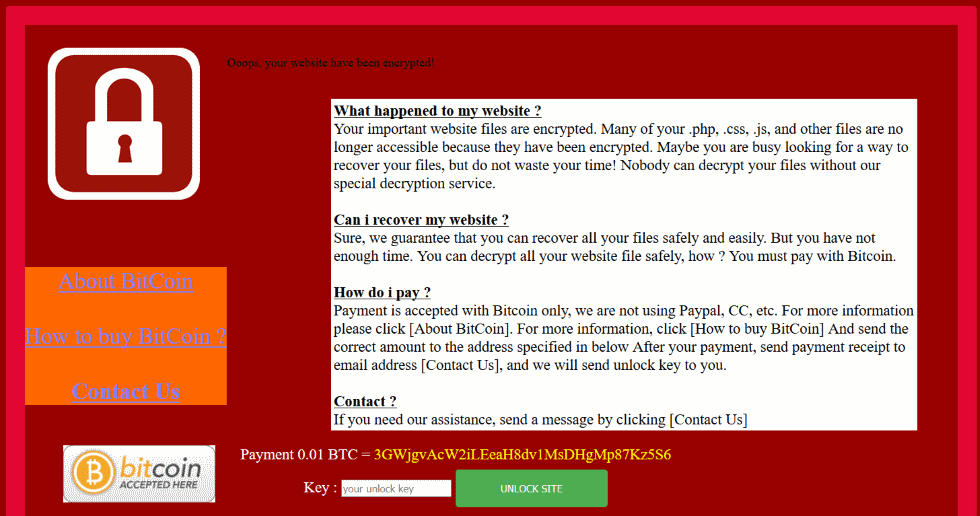
vevolocker ransomware ransom message
The VevoLocker ransomware already has a few variants. Victims will see an image like the one above instead of their usual webpage content.
The extorsion messages, received via email or social media, can look like this:
  • Locked.
  • Ooops!
  • Locked by ALx
  • Website Locked!
  • HACKED BY CENTR1X
  • hacked by n00p
  • fils are descrypted
Some campaigns have even refered directly to Facebook pages like https://www.facebook.com/bloodsec.gov/ or https://www.facebook.com/andi.s.cliquers2.

How to stay safe from the VevoLocker ransomware:

As VevoLocker does not seem to have a decryption tool available yet, consider the following:
To prevent a ransomware attack, continuously update your CMS software. Then, choose a solution that automatically conducts vulnerability scans of web servers and services.
Another great method to avoid VevoLocker and other ransomware variants is to disable global access to the Remote Desktop Protocol (RDP).

Here is a general anti-ransomware protection plan that will be useful in case of future threat campaigns:

  1. Always backup your data and use external sources such as a hard drive or in the cloud (Google Drive, Dropbox, etc.) to store it. Our guide will show you how to do it;
  2. Always update any CMS or tool you use in order to avoid vulnerabilities.
  3. Use strong, unique passwords and only share credentials if it’s absolutely mandatory This security guide comes in handy;
  4. Consider using a paid antivirus software which is also up to date, or consider having a proactive anti ransomware protection (here’s what Heimdal PRO can do for you).
  5. Prevention is the way to avoid potential financial and data losses. These free educational resources can help you gain more knowledge in the cybersecurity field.
Credit : heimdalsecurity.com

4/22/2561

GandCrab ransomware

Security Alert: GandCrab Ransomware Returns with New Waves of Spam Campaigns

In which the malware is spread via malicious files


You may be familiar with GandCrab ransomware that seems to widely spread via various spam campaigns or social engineering techniques to infect and harvest users’ most important data.This fast-growing malware has infected more than 50,000 victims and targeting mostly the ones from Scandinavia and UK speaking countries, according to a report CheckPoint.
Security researchers recently analyzed a new spam campaign in which malicious actors try to lure victims into clicking a malicious link that will open a binary file and infect users’ system with the GandCrab ransomware.
This phishing campaign has been delivered with the following content (sanitized for your own protection).
Here’s how this email looks like:
From: [Spoof / Forwarded Sender Address]
Subject Line:
Job: Banking Opportunities, Greymouth
Content:
Dear Hiring Manager
Please review my [link: http: // abuellail [.] Com / resume. php] resume
Charlotte Anderson
Email: charlotte.anderson @ abuellail [.] com
If a user clicks on the link received on the email, then he will be redirected to one of the following and compromised web pages (sanitized for your online safety):
test.ritsdb [.] com
ubsms [.] com
test.technostark [.] com

How the infection happens

Basically, the malware is spread via an executable binary file (resume.exe) which is returned after GandCrab is running on the local machine as a file called “bhxsew.exe”.
During the process, the ransomware will try to collect and determine the external IP addresses of the victims via legitimate services such as:
Http: // ipv4bot.whatismyipaddress. com
Http: / /bot.whatismyipaddress. Com
The main component of GandCrab is “dropped” as a “bhxsew.exe” file in the <Windows appdata> directory. As part of the local data encryption, this malicious file is configured to communicate with the following domains:
zone alarm [.] bit
ransomware [.] bit
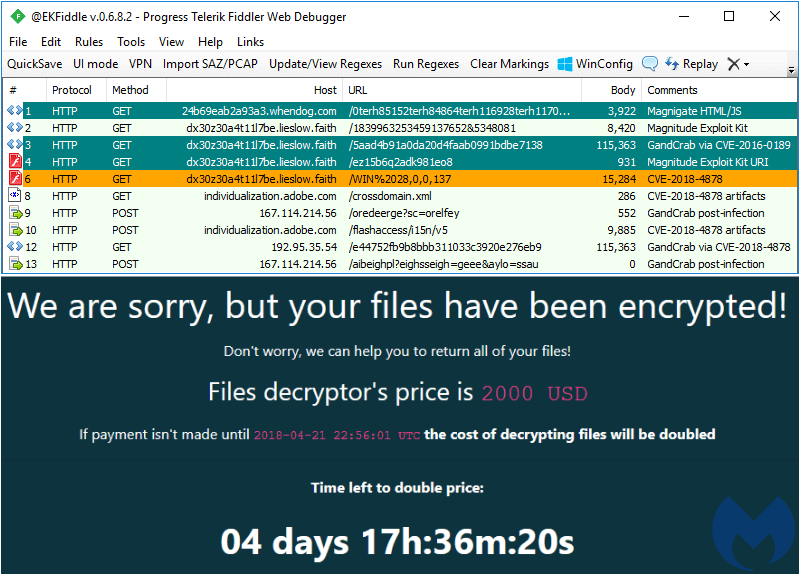
GandCrab ransomware is not spread only via spam emails but also seen distributed via an exploit kit campaign called MagnitudeEK which abuses software vulnerabilities found in Windows, Adobe Flash Player, and Silverlight.
As regards to the MagnitudeEK spam campaign, security researchers have seen a flood of subdomains being used via this site:
lieslow [.] faith
Malwarebytes Labs recently found that Magnitude EK, “which had been loyal to its own Magniber ransomware, was now being leveraged to push out GandCrab, too.”
Here’s how the ransom note is displayed on the infected machine:
Heimdal Security proactively blocked these infected domains (and malicious emails), so all Heimdal PRO and Heimdal CORP users are protected.
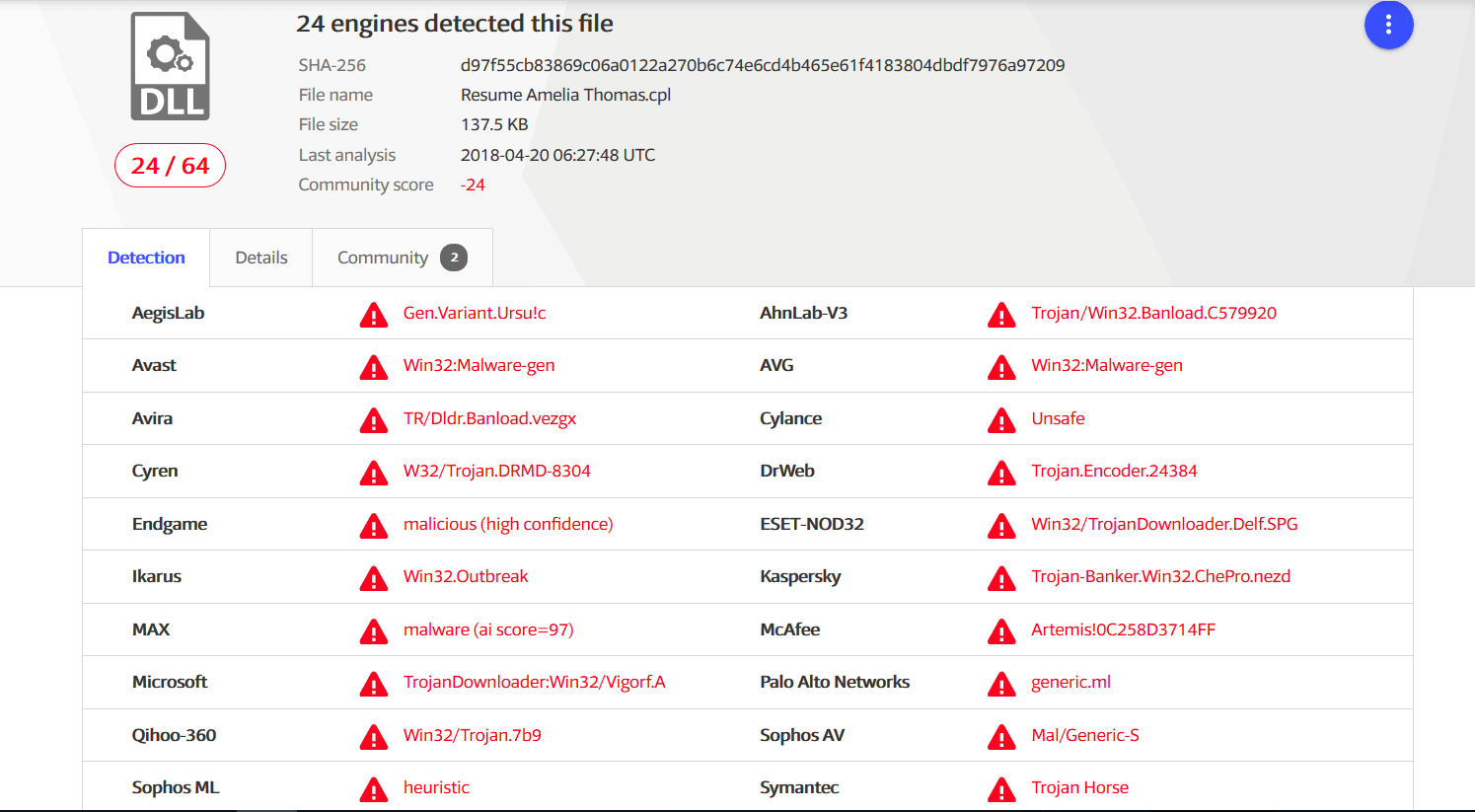
According to VirusTotal, 24 antivirus products out of 64 have detected this spam email campaign at the time we write this security alert.

How to stay safe from the GandCrab ransomware

One of the best ways to keep your important data safe from ransomware is to think and act proactively.
To minimize both the risks and the impact of these online threats, we recommend both home users and companies to use and apply these security measures:
  1. Always backup your data and use external sources such as a hard drive or in the cloud (Google Drive, Dropbox, etc.) to store it. Our guide will show you how to do it;
  2. DO NOT open (spam) or download attachments or links from unknown sources that could infect your computer;
  3. Use strong and unique passwords and never reuse them for multiple accounts. This security guide comes in handy;
  4. Consider using a paid antivirus software which is also up to date, or consider having a proactive anti ransomware protection (here’s what Heimdal PRO can do for you).
  5. Prevention is the best cure, so make sure you learn as much as possible about how to easily detect spam emails. These free educational resources can help you gain more knowledge in the cybersecurity field;
  6. Given the rise of new types of malware (the version 2 of GandCrab ransomware is out there and, unfortunately, there’s no decryption tool available) we remind you that security is not just about using a solution or another, it’s also about improving your online habits and being proactive.
Should you need to understand what ransomware is all about, this dedicated guide will help you.
If you’ve been a victim of the GandCrab ransomware, the good news is that there’s a decryption tool available you can use to recover the valuable data locked by ransomware.
Credit : heimdalsecurity.com

4/21/2560

WannaCry Ransomware

There is so much news surrounding the WannaCry Ransomware outbreak that it is impossible to know where to start reading. As mainstream media outlets are jumping on any new information that may or may not be connected, some articles even raise more questions than they answer.
The fact is: WannaCry ransomware has hit hundreds of thousands of computers since it began spreading on May 12th, 2017, and it has caught the world’s attention like no other.
But what makes this ransomware infection different to any other? How did it spread so fast? And what can we expect in terms of future ransomware attacks?
To find out, we sat down with Emsisoft CTO and Head of Malware Lab, Fabian Wosar, and Emsisoft Ransomware Researcher, Sarah W., to break down the confusion around WannaCry, how to protect against it and why backups are more important now than ever.

Thank you for taking the time to talk about WannaCry and how it affects our customers. To start off: Why is this ransomware different to other strains and how has it spread so fast?

As part of our daily job, we monitor a lot of different channels to identify and track ransomware activity. Those include our malware and research feeds, community channels like forums, ID Ransomware and Twitter. Friday morning our attention was drawn to a lot of activity on Twitter that was WannaCry related.
We soon started to realise that this wasn’t a normal ransomware outbreak when we saw how the NHS was hit and the rate at which entire networks were impacted.

How WannaCry spread

The ‘Eternal Blue’ Windows vulnerability [an exploit discovered by the NSA and kept under wraps] was leaked among a series of others by The Shadow Brokers hacking group in March 2017. WannaCry uses a type of worm that spreads rapidly across networks via this vulnerability that is present in older, unpatched Microsoft operating systems such as Windows XP. Typically, ransomware is downloaded to one computer at a time. However, with this worm, once it is inside a network it spreads like wildfire from computer to computer, without any action from the computer’s user.
This issue was actually patched by Microsoft in March 2017, meaning the worm only impacted computers with out-of-date operating systems. This is typical of hospitals which are bound to existing hardware that is not built to handle modern operating systems, yet are always connected to the internet.
Because this worm only impacts computers that have not had the most recent Windows update installed, any vulnerable computer open to the internet is at risk. This is why we always stress the importance of keeping all software, especially your operating system, up to date.
How wannacry ransomware spreads

Compared to other global ransomware attacks, how sophisticated is WannaCry?

WannaCry as a worm is only remarkable because of the NSA exploit (Eternal Blue) that it uses. However, that exploit code wasn’t written by the malware author, but was pretty much a copy and paste job. There is nothing sophisticated or impressive about copy and paste.
Other than its worm-like behaviour, WannaCry is nothing special in terms of ransomware. If anything, it is rather unsophisticated.
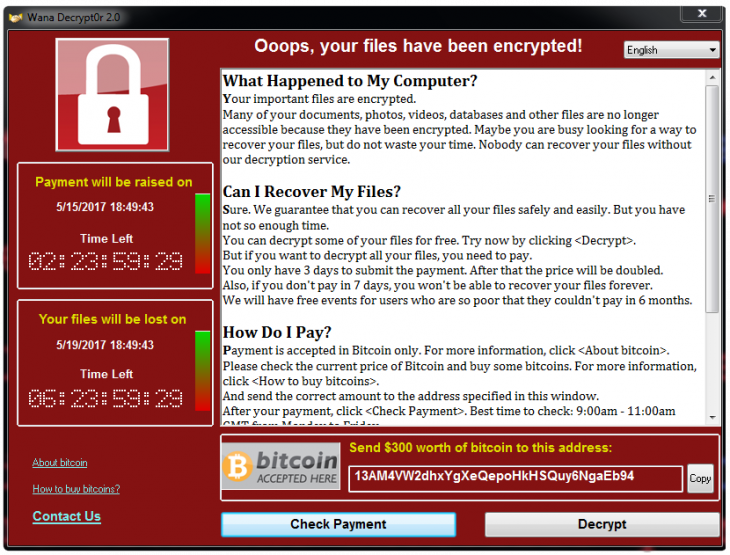
But this is a big issue for victims. The code used to generate an individual bitcoin address for each user was not enabled, meaning that there are 3 bitcoin addresses to be shared between all victims.
The criminals will have almost no idea which victims have actually paid. Since there is no automatic decryption based on an individual’s bitcoin address, the chances of having your files decrypted after payment are very low.
WannaCry Ransomware ransom note -
WannaCry ransom note

Since the outbreak, security researchers have been able to find a “killswitch”. Can you explain what this means exactly?

Essentially, malware doesn’t like to be found in people’s systems as this permits forensic analysis of the code which may ultimately lead to the criminal who developed it. By its very nature, malware often tries to avoid analysis by attempting to detect the artificial environments, usually referred to as “sandboxes”, that are set up by researchers to observe and manipulate malware samples running on a system.
Sandboxes are usually isolated from the internet, but a lot of malware requires some kind of access to the internet to function properly. So, sandboxes often simulate an artificial internet, where every connection to the internet always succeeds and every internet address returns something useful.
One method malware uses to detect such an environment is to just try to access an internet address it knows doesn’t exist. If all of a sudden it can, it assumes it is being executed in such a sandbox. The malware quits whatever it is doing so it can’t be observed and looks like a harmless program; this is what’s referred to as ‘killswitch’.
Usually, these checks are done by generating domain names at random, but in this particular case, the WannaCry ransomware author decided to use a hardwired domain name. When it was registered by a fellow researcher, it became accessible via the real internet as well. So, for the malware, every system with a direct connection to the internet looked like a sandbox. The malware simply shut down, thinking it was being observed.
Yet it is still unclear if this killswitch was intended by the WannaCry author or not. What we do know is that the ransomware hasn’t changed at all, and neither has the worm that is spreading it. Until now, there is no confirmed sighting of a truly recompiled and fixed worm component that uses a different kill switch, apart from a few manually edited ones that have never reached the same distribution of the original.

Do you expect further ransomware attacks based on these exploits?

Almost certainly. We don’t doubt more criminals will be using a similar worm to spread malware, including possibly more ransomware. In fact, a bitcoin miner was already spread this way. Given that we have seen other ransomware, such as Spora ransomware, in the past that has had much more sophisticated payment methods, it is not really a question of “if”, but rather “when” we will see a global ransomware outbreak what will be even more “successful” and costly to its victims.

Is there a way to decrypt your data once you have become a victim of the WannaCry ransomware?

Unfortunately not, as WannaCry uses secure encryption. Even if you pay the criminals, as I mentioned above, they have no way to track payments, so you may not get your files back and instead be asked for more money.

Emsisoft customers were not affected by the attack. Can you explain how, and why in other cases, security software was not able to detect the threat?

In some cases, I would think that victims were simply not running an antivirus or any kind of security software. In the cases where people were running security software, it’s possible that the product’s ransomware behaviour detection may be slightly lacking.
Emsisoft’s products in particular use a layered approach when it comes to protecting our users. We believe that no technology on its own is 100% fool proof. However, by applying multiple different technologies, a very high degree of protection can be achieved. In the case of WannaCry ransomware, Emsisoft customers stayed protected from the beginning via a 3-layered approach:
  1. Firewall: If you were using Emsisoft Internet Security, the firewall inside it would have prevented someone from the outside accessing your port 445, which is the port the vulnerable SMB protocol listens to by default and that the WannaCry worm contacts to exploit. If the port can’t be accessed, no exploitation takes place, so your system is completely protected from the malware.
  2. File Guard: The moment before the worm becomes active on the system, the File Guard will check it against our signature database. Our generic signatures that we created for the WannaCry outbreak back in February did cover most of the variants used in this attack as well, so the attack was stopped. The few variants of the worm component that weren’t already covered were added within 30 minutes.
  3. Behavior Blocker: Once the worm component becomes active, the behavior blocking technology will step in, detecting the malware’s attempt to infect the local system as well as the attempt to infect other systems on the network. Similarly, once the ransomware component becomes active, Emsisoft’s Behavior Blocker will detect the ransomware-like behaviour and stops it in its track.
So our products are designed with failure in one layer in mind, as we don’t subscribe to the philosophy of putting all of our eggs in one basket. Even if one layer doesn’t stop the infection, there are others to step in.
That being said, no product will detect everything. This is why securing your system and making backups is important.

How at risk are consumers and business following this attack, and what else can be done to protect against a future ransomware outbreak?

The 321 backup philosophy is the best protection against ransomware:
Wanna Cry ransomware prevent
Keeping on top of updates for your operating system and all high-risk applications (applications that either access the internet directly or that are used to edit or view documents originating from the internet/email, like browsers, PDF viewers, media players, email clients etc.) is the second most important thing.
Yes, updates can break things sometimes. However, having proper backups mitigates those dangers as it allows a user to simply restore the previous version easily just in case something does break. Backups are awesome like that.
Last but not least, using an up-to-date anti-malware software helps to mitigate the vast majority of all malware, so use it. Using some kind of firewall, either in form of a router or the built-in Windows firewall, helps to mitigate worms like the WannaCry one by isolating potentially vulnerable services from the internet.

Credit: blog.emsisoft.com
https://blog.emsisoft.com/en/27346/wannacry-ransomware-interview/

1/01/2560

Emsisoft Releases Free Decrypter for OpenToYou Ransomware

Emsisoft CTO/researcher Fabian Wosar has created a decrypter for the newly discovered OpenToYou ransomware that will allow infected victims to recover encrypted files without needing to pay a ransom.
The ransomware’s name comes from the email address at which the crook wants victims to reach out (opentoyou@india.com), and by the file extension appended to each encrypted file (.-opentoyou@india.com).

OpenToYou infection process

When it first infects a computer, the OpenToYou ransomware will create a password string, use SHA-1 to derive an encryption key from the password, which it then uses to encrypt the victim’s files with the RC4 algorithm.
The ransomware targets 242 file types for encryption. The following file extensions are targeted:
*.3ds,*.3fr,*.4db,*.7z,*.7zip,*.accdb,*.accdt,*.aes,
*.ai,*.apk,*.arch00,*.arj,*.arw,
*.asset,*.avi,*.bar,*.bay,*.bc6,*.bc7,*.big,*.bik,
*.bkf,*.bkp,*.blob,*.bpw,*.bsa,
*.cas,*.cdr,*.cer,*.cfr,*.cr2,*.crp,*.crt,*.crw,
*.css,*.csv,*.d3dbsp,*.das,*.dazip,
*.db0,*.dba,*.dbf,*.dbx,*.dcr,*.der,*.desc,*.dmp,
*.dng,*.doc,*.docm,*.docx,*.dot,
*.dotm,*.dotx,*.dwfx,*.dwg,*.dwk,*.dxf,*.dxg,*.eml,
*.epk,*.eps,*.erf,*.esm,*.ff,*.flv,
*.forge,*.fos,*.fpk,*.fsh,*.gdb,*.gho,*.gpg,*.gxk,
*.hkdb,*.hkx,*.hplg,*.hvpl,*.ibank,
*.icxs,*.idx,*.ifx,*.indd,*.iso,*.itdb,*.itl,*.itm,
*.iwd,*.iwi,*.jpe,*.jpeg,*.jpg,*.js,
*.kdb,*.kdbx,*.kdc,*.key,*.kf,*.ksd,*.layout,*.lbf,
*.litemod,*.lrf,*.ltx,*.lvl,*.m2,
*.m3u,*.m4a,*.map,*.max,*.mcmeta,*.mdb,*.mdbackup,
*.mddata,*.mdf,*.mef,*.menu,*.mlx,
*.mov,*.mp3,*.mp4,*.mpd,*.mpp,*.mpqge,*.mrwref,
*.myo,*.nba,*.nbf,*.ncf,*.nrw,*.nsf,
*.ntl,*.nv2,*.odb,*.odc,*.odm,*.odp,*.ods,*.odt,
*.ofx,*.orf,*.p12,*.p7b,*.p7c,*.pak,
*.pdb,*.pdd,*.pdf,*.pef,*.pem,*.pfx,*.pgp,*.pkpass,
*.png,*.ppj,*.pps,*.ppsx,*.ppt,
*.pptm,*.pptx,*.prproj,*.psd,*.psk,*.pst,*.psw,*.ptx,
*.py,*.qba,*.qbb,*.qbo,*.qbw,
*.qdf,*.qfx,*.qic,*.qif,*.raf,*.rar,*.raw,*.rb,*.re4,
*.rgss3a,*.rim,*.rofl,*.rtf,
*.rw2,*.rwl,*.saj,*.sav,*.sb,*.sdf,*.sid,*.sidd,
*.sidn,*.sie,*.sis,*.sko,*.slm,*.snx,
*.sql,*.sr2,*.srf,*.srw,*.sum,*.svg,*.sxc,*.syncdb,
*.t12,*.t13,*.tar,*.tax,*.tbl,
*.tib,*.tor,*.txt,*.upk,*.vcf,*.vdf,*.vfs0,*.vpk,
*.vpp_pc,*.vtf,*.w3x,*.wallet,*.wb2,
*.wdb,*.wma,*.wmo,*.wmv,*.wotreplay,*.wpd,*.wps,
*.x3f,*.xf,*.xlk,*.xls,*.xlsb,*.xlsm,
*.xlsx,*.xml,*.xxx,*.zip,*.ztmp
As a side note, OpenToYou also encrypts files without a file extension.
The ransomware will lock files on all drives, with the exemption of the following folders:
C:$Recycle.Bin
C:Logs
C:UsersAll Users
C:Windows
C:ProgramData
C:Program Files
C:Program Files (x86)
C:nvidia
C:intel
C:Boot
C:bootmgr
C:PerfLogs
C:Drivers
C:MSOCache
C:Program instal
%USERPROFILE%AppData
Unfortunately, this exemptions list contains an error. “C:bootmgr” is not a folder, but a file.
This slip-up on the part of OpenToYou’s author leads to situations where the ransomware encrypts the boot loader “bootmgr” on Windows workstations that use the MBR to boot. This leaves the victim’s computer in the unfortunate situation of not being able to boot the next time they restart their PC.
After the encryption process ends, the ransomware will replace the user’s desktop wallpaper with the following image:
OpenToYou-Ransom-Note
At the same time, OpenToYou drops a file named !!!.txt on the user’s Desktop. This file contains a written version of the ransom note, as reproduced below:
Your files are encrypted!
To decrypt write on email – opentoyou@india.com
Identification key – 5E1C0884
The number “5E1C0884” from the ransom note above is the victim’s ID, which he must send to the ransomware author via email. This ID is each computer’s C: drive’s volume serial number.
Volume-Serial-Number-OpenToYou
At the time of writing, the ransomware appears to be under development. The reason behind this assumption is the ransomware creates a folder named “C:Logs” to store temporary files and debug data.
This folder’s content is always the same, and its presence can be used to detect OpenToYou ransomware infections in their early stages.
C:Logs1.bmp      [the desktop wallpaper image]
C:Logs1.jpg      [the desktop wallpaper image]
C:LogsAllFilesList.ini
C:LogsLog.ansi.txt
C:LogsLog.UTF-16LE.txt
Victims affected by this ransomware can recover their data using the Emsisoft OpenToYou Decrypter, which is available for download on our site.
Emsisoft-OpenToYou-Decrypter
It is not uncommon to see in-dev ransomware being analysed and decrypted even before it’s delivered to users via spam or malvertising campaigns. If you’ve been infected by a version of this ransomware, don’t hesitate to reach out to Emsisoft researchers for help.
Users employing Emsisoft Anti-Malware or Emsisoft Internet Security have been proactively protected from this threat by Emsisoft’s Behavior Blocker technology:
OpenToYou-Detection
This blog post is based on the OpenToYou ransomware sample with the following SHA-256 hash: 3363542a8224cb7624b699fbcc34143c80ad1063196763b9fea0e6f45091454c.
Credit : blog.emsisoft.com
 https://blog.emsisoft.com/en/25673/emsisoft-releases-free-decrypter-for-opentoyou-ransomware/

7/15/2558

New Version of TeslaCrypt Changes Encryption Scheme


New Version of TeslaCrypt Changes Encryption Scheme
by Dennis Fisher    July 14, 2015 , 2:26 pm
A new version of the nasty TeslaCrypt ransomware is making the rounds, and the creators have added several new features, including an improved encryption scheme and some details designed to mimic CryptoWall.
TeslaCrypt is among the more recent variants of ransomware to emerge and the malware, which is a variant of CryptoLocker, is unique in that it targets files from gaming platforms as well as other common file types. Version 2.0.0 of TeslaCrypt, discovered recently by researchers at Kaspersky Lab, no longer uses a typical GUI to show users the warning about their files being encrypted. Instead, the malware opens a page in the user’s browser to display a warning message that is taken directly from CryptoWall.
That change, researchers speculated, could be a way to make TeslaCrypt seem more intimidating.
“Why use this false front? We can only guess – perhaps the attackers wanted to impress the gravity of the situation on their victims: files encrypted by CryptoWall still cannot be decrypted, which is not true of many TeslaCrypt infections,” Fedor Sinitsyn of Kaspersky Lab wrote in an analysis of the new ransomware. 
But the more significant modification in version 2.0.0 is the inclusion of an updated encryption method. TeslaCrypt, like many other ransomware variants, encrypts the files on victims’ machines and demands a payment in order to obtain the decryption key. The payment typically must be in Bitcoin and the attackers using crypto ransomware have been quite successful in running their scams. Estimates of the revenue generated by variants such as CryptoLocker run into the millions of dollars per month.
Researchers have had some success in finding methods to decrypt files encrypted by ransomware, specifically TeslaCrypt. But the change to the malware’s encryption method may make that more difficult.
“The encryption scheme has been improved again and is now even more sophisticated than before. Keys are generated using the ECDH algorithm. The cybercriminals introduced it in versions 0.3.x, but in this version it seems more relevant because it serves a specific purpose, enabling the attackers to decrypt files using a ‘master key’ alone,” Sinitsyn said.
“Each file is encrypted using the AES-256-CBC algorithm with session_priv as a key. An encrypted file gets an additional extension, ‘.zzz’. A service structure is added to the beginning of the file, followed by encrypted file contents.”
The TeslaCrypt authors also took out the decryption mechanism in the malware that researchers were able to exploit in previous versions.
- See more at: https://threatpost.com/new-version-of-teslacrypt-changes-encryption-scheme/113786#sthash.iec6Yax9.dpuf

ที่มา : Threatpost.com

7/02/2558

CRYPTOWALL.exe

SHA256:083d687d05a71fd04e71417d3b9b23e6438f4d91f55a9b9b6db4a3de96b68dd5
File name:CRYPTOWALL.exe
Detection ratio:32 / 56
Analysis date:2015-07-02 06:14:43 UTC

Antivirus Result Update
ALYac Trojan.GenericKD.2527072 20150702
AVG Inject2.CKWZ 20150702
AVware Win32.Malware!Drop 20150702
Ad-Aware Trojan.GenericKD.2527072 20150702
Avast Win32:Malware-gen 20150702
Avira TR/Andromeda.18114919 20150702
Baidu-International Trojan.Win32.Ransom.vta 20150701
BitDefender Trojan.GenericKD.2527072 20150702
Comodo TrojWare.Win32.UMal.~A 20150702
DrWeb Trojan.Encoder.514 20150702
ESET-NOD32 a variant of MSIL/Injector.KLA 20150702
Emsisoft Trojan.MSIL.Injector (A) 20150702
F-Secure Trojan.GenericKD.2527072 20150702
Fortinet MSIL/Injector.KKR!tr 20150702
GData Trojan.GenericKD.2527072 20150702
Ikarus Trojan.MSIL.Injector 20150702
K7AntiVirus Trojan ( 004c75a71 ) 20150702
K7GW Trojan ( 004c75a71 ) 20150702
Kaspersky Trojan-Ransom.Win32.Cryptodef.vta 20150702
Malwarebytes Trojan.Tinba 20150701
McAfee RDN/Spybot.bfr!r 20150702
McAfee-GW-Edition BehavesLike.Win32.Backdoor.dc 20150701
MicroWorld-eScan Trojan.GenericKD.2527072 20150702
Panda Trj/Chgt.O 20150701
Sophos Mal/Generic-S 20150702
Symantec Trojan.Cryptodefense 20150702
Tencent Win32.Trojan.Bp-generic.Wpav 20150702
TrendMicro TROJ_CRYPWALL.XXRY 20150702
TrendMicro-HouseCall TROJ_CRYPWALL.XXRY 20150702
VIPRE Win32.Malware!Drop 20150702
ViRobot Trojan.Win32.S.CryptoWall.270336[h] 20150702
nProtect Trojan.GenericKD.2527072 20150701
AegisLab
20150702
Agnitum
20150630
AhnLab-V3
20150701
Alibaba
20150630
Antiy-AVL
20150702
Arcabit
20150630
Bkav
20150701
ByteHero
20150702
CAT-QuickHeal
20150701
ClamAV
20150702
Cyren
20150702
F-Prot
20150702
Jiangmin
20150701
Kingsoft
20150702
Microsoft
20150702
NANO-Antivirus
20150702
Qihoo-360
20150702
Rising
20150701
SUPERAntiSpyware
20150702
TheHacker
20150701
TotalDefense
20150701
VBA32
20150701
Zillya
20150702
Zoner
20150702

7/01/2558

How to remove Crypt0L0cker (Not CryptoLocker)

 ## รบกวนผู้ที่เข้ามาอ่านช่วยกันแชร์ด้วนะครับ ##

*คำเตือน ห้ามจ่ายเงิน โดยเด็ดขาด  เพราะจะเสียทั้งเงินและไม่ได้ข้อมูลคืน เนื่องจาก การเข้ารหัสที่ผิดพลาดของCrypto creator ของ Crypt0L0cker เอง ทำให้ผู้ที่ติด Ransomware ตัวนี้ได้รับรหัสที่ผิด  ถ้าจ่ายเงินก็ได้รหัสที่ไม่สามารถถอดรหัสได้ เช่นกัน (Wrong Encrypt + Fail DecryptCode+Loss money) Photobucket


Crypt0L0cker คล้าย แต่ไม่เหมือนกับ CryptoLocker (TorrentLocker) ซึ่งตัว CryptoLocker นี้จะใช้
TorrentUnlocker Decrypt TorrentLocker (DecrypterFixer : Nathan Scott) ในการถอดรหัส


Crypt0L0cker จะเข้ารหัสไฟล์เกือบทั้งหมดในเครื่อง ยกเว้นไฟล์เหล่านี้ ที่ไม่ถูกเข้ารหัส
.html, .inf, .manifest, .chm, .ini, .tmp, .log, .url, .lnk, .cmd, .bat, .scr, .msi, .sys, .dll, .exe,  .avi, .wav, .mp3, .gif, .ico, .png, .bmp and .txt

หลังจาก Crypt0L0cker เข้ารหัสไฟล์เสร็จ จะสร้างไฟล์ ทิ้งไว้ใน folder คือ
DECRYTP_INSTRUCTIONS.html
DECRYPT_INSTRUCTIONS.txt

File encrypt :
Algorithm – RSA-2048 (AES CBC 256-bit encryption algorithm)

คอมพิวเตอร์เป้าหมายคือ อยู่ในกลุ่มประเทศดังต่อไปนี้ คือ
Australia, Austria, Canada, Czech Republic, Italy, Ireland, France, Germany, Netherlands, Korea, Thailand, New Zealand, Spain, Turkey, and the United Kingdom

เมื่อติด Crypt0L0cker แล้ว ไฟล์ที่ถูกเข้ารหัสจะมานามสกุล .encrypted และจะแสดงข้อความเรียกค่าไถ่ โดยข้อความที่แสดงจะแปลเป็นภาษาต่างๆ ตามแต่ละแต่เทศในกลุ่มเป้าหมายที่ติด ตามภาพตัวอย่างด้านล่าง


วิธีกำจัด Crypt0L0cker (เดี๋ยวพรุ่งนี้จะ Update รูปภาพ คำอธิบายให้นะครับ)
*เมื่อท่านติดไวรัสพวกนี้แล้ว และยังไม่ได้กำจัดตัวไวรัส อย่าเอา External drive มาเสียบกับคอมพิวเตอร์ของท่านเด็ดขาด เพราะข้อมูลใน External driveจะถูกเข้ารหัสไปด้วย

*หาก เมื่อท่านรู้ตัวว่ากำลังติดไวรัสพวกเข้ารหัสไฟล์ ให้รีปปิดเครื่องทันที (วิธีที่เร็วสุดคือดึงปลั๊กออก)สังเกตุได้จากเครื่องจะช้ามาก วิธีนี้ก็ขึ้นอยู่กับว่ารู้ตัวเร็วแค่ไหนครับ เพราะไวรัสก็ต้องใช้เวลาในการเข้ารหัสไฟล์ (แต่ไม่นาน) ขึ้นอยู่กับว่าเครื่องมีข้อมูล ไฟล์ที่เป็นเป้าหมายมากน้อยแค่ไหน (แต่ผู้ใช้ส่วนใหญ่ จะไม่ทราบว่ากำลังติดไวรัส) แล้วห้ามเปิดเครื่องอีก ให้ถอด harddisk ไปต่อกับเครื่องอื่่นแล้ว scan ไวรัส หรือเปิดเครื่องแล้ว set ให้ boot จาก Rescue CD แทนครับ

1. Malwarebyte Anti Malware Malwarebytes Anti Malware Download link
2. HitManPro HitmanPro Download link


หมายเหตุ :
ตัวเลือกอื่นๆ ที่ใช้กำจัด Crypt0L0cker
EMSISOFT EMERGENCY KIT
RogueKiller
Kaspersky Rescue Disk
Avira AntiVir Rescue CD

วิธีกู้ไฟล์
Crypt0L0cker จะพยายามที่จะลบสำเนาไฟล์ทั้งหมด ถ้าโชคดี อาจกู้คืนด้วย shadow copies 
(แต่ส่วนใหญ่ไฟล์พวก Restore จะถูก delete ทิ้งไปด้วย) ทั้งนี้ทั้งนั้น การ Restore หรือทำ shadow copies  จะทำได้ไม่ได้ ก็ขึ้นอยู่กับว่า เราได้ทำการเปิด เปิด system restore ไว้ก่อนที่จะติดไวรัสหรือเปล่า)
Option 1. กด shadow copies Shadowexplorer Download link
Option 2. กู้ไฟล์ โดยใช้โปรแกรมกู้ไฟล์ตัวไหนก็ได้ (แนะนำลองใช้ Recuva ดูก่อน) เนื่องจากก่อนที่ไวรัสจะเข้ารหัสไฟล์และลบไฟล์ต้นฉบับทิ้ง ไวรัสจะสำเนาไฟล์และเข้ารหัสไฟล์ที่ได้สำเนาไว้จากนั้นจึงลบไฟล์ต้นฉบับทิ้ง ทำให้แนวทางการใช้โปรแกรมกู้ไฟล์มีโอกาสได้ข้อมูลกลับคืน (แต่มีข้อแนะนำว่า หลังจากติดไวรัสไม่ ไม่ควร copy ไฟล์อะไรที่ไม่จำเป็นลงใน harddisk เพราะไฟล์ต้นฉบับอาจถูกเขียนทับได้ครับ)

Recuva
EaseUS Data Recovery Wizard Free
R-Studio (shareware)


3. เมื่อกำจัดไวรัสเรียบร้อยแล้ว แนะจำให้ติดตัังโปรแกรมพวก Crypto Prevention ดูเพิ่มเติมจาก Link นี้นะครับ
http://www.malwarefighting.blogspot.com/2015/06/cryptoprevent-tool.html
http://www.malwarefighting.blogspot.com/2015/06/ransomware-fighter-tool.html

Repair File
กรณีไฟล์ ที่กู้ หรือถอดรหัสได้ แต่ไม่สามารถเปิดได้ แนะนำให้ใช้โปรแกรมซ่อมแซมไฟล์คือ
File Repair
http://www.malwarefighting.blogspot.com/2015/07/repair-file-tool-decrypt-ransomware.html/2015/07/repair-file-tool-decrypt-ransomware.html

บางไฟล์อาจจะได้ร้บความเสียหายจนซ่อมไม่ได้นะครับ (ทำใจไว้เผื่อเลยครับ)

 *******************************************************************
ใครที่ติดจะลองทดสอบถอดรหัสผ่าน Decrypt Tool พวกนี้ดูก็ได้นะครับ เผื่อว่ามีการ Update เผื่อข้อมูลการถอดรหัสแล้ว (แต่คิดว่ายังถอดไม่ได้ เนื่องจากเหตุผลที่ได้อธิบายไว้ตั่้งแต่ต้นครับ)
Noransom.kaspersky.com
TorrentUnlock De-ransom DecryptoFixer By Nathan Scott
Panda Unransom by pandasecurity.com
Free decryption for Dr.Web commercial customers

สุดท้ายอย่าลืมสำรองข้อมูลเก็บกันไว้บ้างนะครับ
ขอให้โชคดีทุกท่านครับ

6/30/2558

CryptoMonitor - Preventing Today's Top Ransomware (CryptoWall, PClock, C...

CryptoMonitor

By_CryptoMonitor322.png


Useful information!
All bugs and issues that were present in V1 of CryptoMonitor has now been fixed in CryptoMonitor V2. Thanks for your patience, and thanks to all the members who helped get CryptoMonitor to a stable build!


CryptoMonitor is a new Anti-Ransomware solution that was developed to protect your computer or server against the wave of encrypting Ransomware that has been in the wild the last few years. These infections, like CryptoWall, CryptoLocker, CTB Locker, CryptorBit, KeyHolder, TELSA, Operation Global, TorrentLocker, CryptoDefense, ZeroLocker (And Many Many More.), will use numerous exploits or other methods to get onto the victims machine and once launched encrypts/locks all personal files. When completed the Ransomware will then hold true to its name, and demand a ransom in order to get your files back, or forever face life without them.

All too often victims do not have backups of their files, cannot or will not pay the criminals, or their Anti-Virus software simply wasn't enough to prevent these attacks. With all of this in mind, CryptoMonitor was created to prevent your data being encrypted even when the ransomware bypasses your installed anti-virus solution.

CryptoMonitor does not rely on definitions to protect you from encrypting ransomware, but instead relies on behavioral detection that allows it to detect encrypting ransomware before it has a chance to encrypt your data. With this type of approach, even brand new crypto-ransomware infections will be stopped in their tracks without you having to worry about updates to the software. In fact, 90% of the time CryptoMonitor will lay in your system tray silently protecting you until the day you need it, and if that day comes your data will be safe.


Supported Operating Systems:
Windows XP - Windows 10


Protection Overview

Settings-alerts.png

CryptoMonitor currently has 2 types of protection included in it (There will be add on protection methods in the future). There protection methods are called Entrapment Protection and Count Protection. Entrapment is the main protection method that is recommended to always be on, and is the quickest and most accurate way to detecting Ransomware. Count Protection is the secondary "Double Protection" that is optional. Count Protection is a very thorough and sensitive method and should be used when you want the most extreme protection from Ransomware. Count Protection can also have false positives at times.

Entrapment Protection
Entrapment Protection lays numerous different types of traps all around your system that a Ransomware Infection cannot resist to touch. These traps send encrypted pattern signals back and forth between CryptoMonitor and themselves constantly. When a Ransomware Infection falls into one of these traps, the pattern is broken and CryptoMonitor immediately takes action. Once this happens, the machine is locked down and you are alerted about the infection and prompted for your decision on what actions to take. During this time, no file modifications are allowed, so your files are safe while you think about your course of action. With this protection enabled you may notice a few hidden files, registry keys, folders, and services running, but don't worry, they are there to protect you!

Count Protection (Pro Version Only)

Count Protection is a feature in the Pro version that is a offers double protection to your machine from Ransomware. This option is extremely sensitive and is the highest setting currently available to protect your files. CryptoMonitor Count Protection will constantly scan processes and use heuristics to categorize them into absolute trusted, unknown, and suspicious. While doing this, Count Protection will also log every time a process that isn't trusted calls API's to modify a personal file. Depending on the setting you set, when the process modifies over a certain number of personal files, under a certain time, then a flag is raised and CryptoMonitor will prompt you to take action.

For example: In my settings I may set it so that Count Protection only lets untrusted processes to modify 5 files in under 2 minutes. Now, if CryptoWall.exe modifies 6 files within 2 minutes, which it could easily do, then the machine would become locked and action needs to be taken.

Unfortunately, this protection method could lead to false positives due to backup software or other mass file manipulation programs. For this reason, we have included the ability to whitelist executables that may exhibit this behavior.


CryptoMonitor Alerts
CryptoMonitor supports 2 types of alerting systems beside the prompt that is shown on screen when a infection is detected. These 2 types of alerts are Emails (Free and Pro) and Text Messages (Pro only). If set up in CryptoMonitor's settings, anytime a Ransomware flag is found and the machine gets locked down, a alert would be sent to either your email, phone, or both if setup this way.

To use these 2 Alerting systems, you must supply CryptoMonitor Settings the SMTP information of a email you plan to use to send these alerts from. This process may be a little confusing at first, but here is a great example on how to setup SMTP in a application like CryptoMonitor. If you get too confused, simply make a GMAIL Acct. and follow the directions since you will only be using this email to send alerts from the application anyways. Setup SMTP in a application


Process Injection Check (Pro Version Only)
More and more infections are injecting their code into legitimate processes rather than launching their own executable. This makes it harder for protection software, and even a person, to detect these computer infections because the injected processes look legitimate. Because whitelisting processes is possible with CryptoMonitor, we began to see an issue. What if the whitelisted application had malicious code injected into it? Then it would pass all our protection by being stealthy in a whitelisted app. With this in mind we created the Injection Check method in the Pro Version that checks for injected code, and if injected code is found, it is then treated as a hostile process and no longer a whitelisted one.


LockMode (Pro Version Only)

LockDown.png

LockMode is a pro version feature that happens when CryptoMonitor could not Kill/Remove a infection right away. When LockMode is enabled, all modifications to your system are blocked until the infection can be removed manually or by a professional. Once this is complete you may turn off LockMode at any time. Think of it as your PC's FallOut Plan.


CryptoMonitor License Type Comparison

FvP_CM.png

CryptoMonitor has a Free version and a PRO version. The main difference between the free version and PRO, is that the free version will not be able to protect you against encrypting Ransomware that injects malicious code into legitimate processes. In the free version, if a ransomware launches its own executable, then CryptoMonitor will attempt to terminate the process and alert you when behavioral flags are tripped. On the other hand, if the ransomware injects code into a legitimate process, then the free version will alert you but not be able to prevent the encryption from happening or terminate the legitimate process. The Pro version, though, would be able to protect you from both types of Ransomware.

Below is a list of the features of the Free and Pro versions.


CryptoMonitor Free features:
  • Entrapment Protection as described above
  • Email alerts
  • The ability to automatically terminate malware processes when encryption attempts are detected. This does not protect you from injected processes.
Additional PRO only features:
  • LockDown Mode (Keeps any processes from making changes to files if CryptoMonitor could not remove the threat, until a professional can remove it.)
  • Ability to kill and block injected malicious code in legitimate processes.
  • Blocks file modification until you make a decision on if the process is a threat or not.
  • Ability to remove the threat after CryptoMonitor has killed it.
  • Count Protection (Double protection from Ransomware by monitoring how many files are modified.)
  • Ability to send Text Alerts when an infection flag is found.
  • Check processes for malicious code injection.


Videos of CryptoMonitor in Action

EasySync CryptoMonitor - Preventing and removing CTB Locker Ransomware

EasySync CryptoMonitor - Preventing and removing CryptoFortress and Torrentlocker

EasySync CryptoMonitor - Preventing and removing CryptoFortress and Torrentlocker 2

EasySync CryptoMonitor - Preventing and removing CryptoLocker Generic Ransomware

EasySync CryptoMonitor - Free Version Infection Pop up

Information

==============================================
PeeTechFix >> JupiterFix
==============================================
Photobucket

วิธีใช้งาน : JupiterFix-Win32.PSW.OnlineGames
ท่านสามารถตรวจสอบรายชื่อ Virus ที่โปรแกรม สามารถ Clean ได้ ใน VirusList.txt
-------------------------------------------------------------------------------------
ท่านใดที่ Download PeeTechFix tool ไปใช้แล้วมีปัญหาหรือลบไม่ออก โปรดแจ้งปัญหา ที่ email : MalwareHunter.info@gmail.com ด้วยครับ หรือส่งไฟล์ virus ให้ด้วย จะขอบพระคุณอย่างยิ่ง
-------------------------------------------------------------------------------------
Safemode Recovery (.reg) แก้ปัญหา Virus ลบ Key Safeboot แล้วเข้า safemode ไม่ได้
------------------------------------------------------------------------------------
วิธีแก้ Error message (แก้อาการเปิดไฟล์ .exe ใน USB Drive ไม่ได้)
"Windows cannot open this program because it has been prevented by a software restriction policy. For more information, open Event Viewer or contact your system administrator"
วิธีแก้ ดูที่ link นี้ครับ
-------------------------------------------------------------------------------------
วิธีแก้ MSN /Windows Live Messenger Disconnect (จาก virus OnlineGames)
-------------------------------------------------------------------------------------
How to start Windows in Safe Mode

Popular Posts