"Malware Fix รวมวิธีแก้ปัญหา virus computer โครงการทำดีเพื่อสังคม" "ต้องขออภัยผู้เยี่ยมชมทุกท่านนะครับ ที่เ้ข้ามาแล้ว ไม่ค่อยได้มีการ update หรือทดสอบ virus ตัวใหม่ๆ เนื่องจากภาระหน้าที่การงาน"

Alert


Photobucket
แจ้งเตือนภัย ! Crypt0L0cker (Ransomware)
เข้ารหัสข้อมูลใน คอมพิวเตอร์ กำลังระบาดในไทย
และกำลังระบาดหนักในเกาหลี
ThaiCERT , Crytpo Prevention Tool

*ห้ามจ่ายเงินโดยเด็ดขาด เพราะจะเสียทั่้งเงินและกู้ข้อมูลไม่ได้
รบกวนคนที่เข้ามาอ่านช่วยแชร์ด้วยนะครับ
How to remove Crypt0L0cker

3/24/2559

How to manually create Software Restriction Policies to block TorrentLocker

วิธี Set Local Security Policy ป้องกัน CryptoLocker (Ransomware)
How to manually create Software Restriction Policies to block TorrentLocker:
In order to manually create the Software Restriction Policies you need to be using Windows Professional or Windows Server. If you want to set these policies for a particular computer you can use the Local Security Policy Editor. If you wish to set these policies for the entire domain, then you need to use the Group Policy Editor. Unfortunately, if you are a Windows Home user, the Local Policy Editor is not available and you should use the CryptoPrevent tool instead to set these policies. To open the Local Security Policy editor, click on the Start button and type Local Security Policy and select the search result that appears. You can open the Group Policy Editor by typing Group Policy instead. In this guide we will use the Local Security Policy Editor in our examples.
Once you open the Local Security Policy Editor, you will see a screen similar to the one below.
Local Security Policy Editor
Once the above screen is open, expand Security Settings and then click on the Software Restriction Policies section. If you do not see the items in the right pane as shown above, you will need to add a new policy. To do this click on the Action button and select New Software Restriction Policies. This will then enable the policy and the right pane will appear as in the image above. You should then click on the Additional Rules category and then right-click in the right pane and select New Path Rule.... You should then add a Path Rule for each of the items listed below.
If the Software Restriction Policies cause issues when trying to run legitimate applications, you should see this section on how to enable specific applications.
Below are a few Path Rules that are suggested you use to not only block the infections from running, but also to block attachments from being executed when opened in an e-mail client.
Block TorrentLocker executable in %AppData%
Path: %AppData%\*.exe
Security Level: Disallowed
Description: Don't allow executables to run from %AppData%.
Block TorrentLocker executable in %LocalAppData%
Path if using Windows XP: %UserProfile%\Local Settings\*.exe
Path if using Windows Vista/7/8: %LocalAppData%\*.exe
Security Level: Disallowed
Description: Don't allow executables to run from %AppData%.
Block Zbot executable in %AppData%
Path: %AppData%\*\*.exe
Security Level: Disallowed
Description: Don't allow executables to run from immediate subfolders of %AppData%.
Block Zbot executable in %LocalAppData%
Path if using Windows XP: %UserProfile%\Local Settings\*\*.exe
Path if using Windows Vista/7/8: %LocalAppData%\*\*.exe
Security Level: Disallowed
Description: Don't allow executables to run from immediate subfolders of %AppData%.
Block executables run from archive attachments opened with WinRAR:
Path if using Windows XP: %UserProfile%\Local Settings\Temp\Rar*\*.exe
Path if using Windows Vista/7/8: %LocalAppData%\Temp\Rar*\*.exe
Security Level: Disallowed

Description: Block executables run from archive attachments opened with WinRAR.
Block executables run from archive attachments opened with 7zip:
Path if using Windows XP: %UserProfile%\Local Settings\Temp\7z*\*.exe
Path if using Windows Vista/7/8: %LocalAppData%\Temp\7z*\*.exe
Security Level: Disallowed

Description: Block executables run from archive attachments opened with 7zip.
Block executables run from archive attachments opened with WinZip:
Path if using Windows XP: %UserProfile%\Local Settings\Temp\wz*\*.exe
Path if using Windows Vista/7/8: %LocalAppData%\Temp\wz*\*.exe
Security Level: Disallowed

Description: Block executables run from archive attachments opened with WinZip.
Block executables run from archive attachments opened using Windows built-in Zip support:
Path if using Windows XP: %UserProfile%\Local Settings\Temp\*.zip\*.exe
Path if using Windows Vista/7/8: %LocalAppData%\Temp\*.zip\*.exe
Security Level: Disallowed

Description: Block executables run from archive attachments opened using Windows built-in Zip support.

You can see an event log entry and alert showing an executable being blocked:
Event Log Entry

Executable being blocked alert
If you need help configuring this, feel free to ask in the TorrentLocker help topic.

How to allow specific applications to run when using Software Restriction Policies
If you use Software Restriction Policies, or CryptoPrevent, to block TorrentLocker you may find that some legitimate applications no longer run. This is because some companies mistakenly install their applications under a user's profile rather than in the Program Files folder where they belong. Due to this, the Software Restriction Policies will prevent those applications from running.
Thankfully, when Microsoft designed Software Restriction Policies they made it so a Path Rule that specifies a program is allowed to run overrides any path rules that may block it. Therefore, if a Software Restriction Policy is blocking a legitimate program, you will need to use the manual steps given above to add a Path Rule that allows the program to run. To do this you will need to create a Path Rule for a particular program's executable and set the Security Level to Unrestricted instead of Disallowed as shown in the image below.

Unrestricted Policy

Once you add these Unrestricted Path Rules, the specified applications will be allowed to run again.

7/24/2558

Porn clicker keeps infecting apps on Google Play


Lately we informed you how a fake Dubsmash application has been uploaded to Google Play Store at least nine times, which have tens of thousands of installs. This porn clicker Trojan, which we detect as Android/Clicker, has once more become available for download from Play Store. After we notified Google and published an article about these fake Dubsmash Trojans, we discovered other fake Dubsmash versions being uploaded again infected with the same porn clicker. We detected yet another 51 Trojan porn clickers accessible for the users to download. Four of them had more than 10,000 installs and one of them had more than 50,000 installs.
This 51 together with 9 fake Dubsmash we reported in the previous article users were able to download 60 different Trojan clicker applications from Google Play. These Trojan clickers were downloaded at least 210,000 times in the last three months. In the weeks after our article was published, these apps were installed more than 106,000 times.
This time not only were fake versions of Dubsmash uploaded by the same developer, we also found Download Manager, Pou 2, Clash of Clans 2, Subway surfers 2, Subway surfers 3, Minecraft 3, Hay Day 2, various game cheats and Video Downloaders being infected with the same Trojan Clicker.
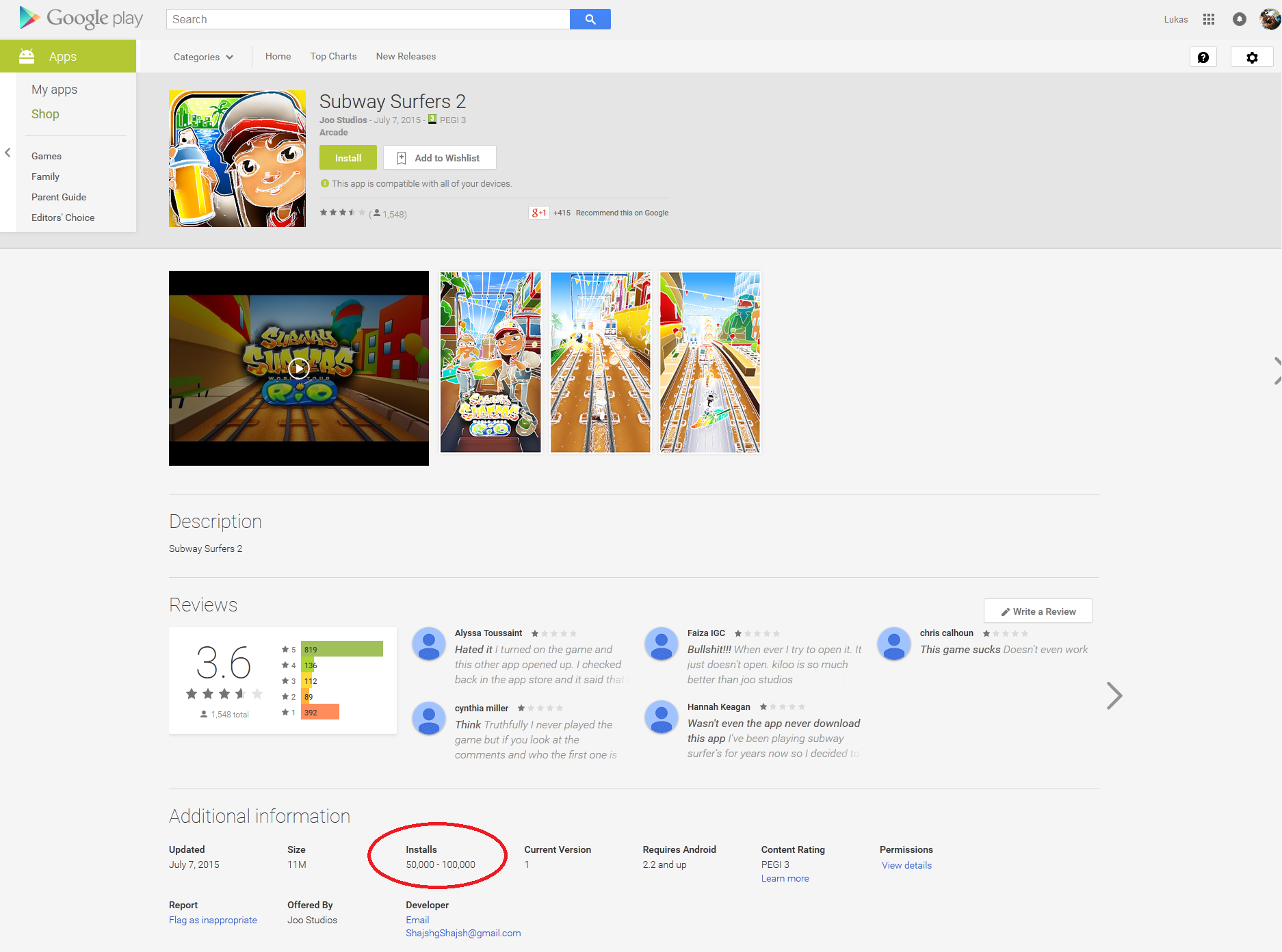
Figure 1 Fake Subway Surfers 2
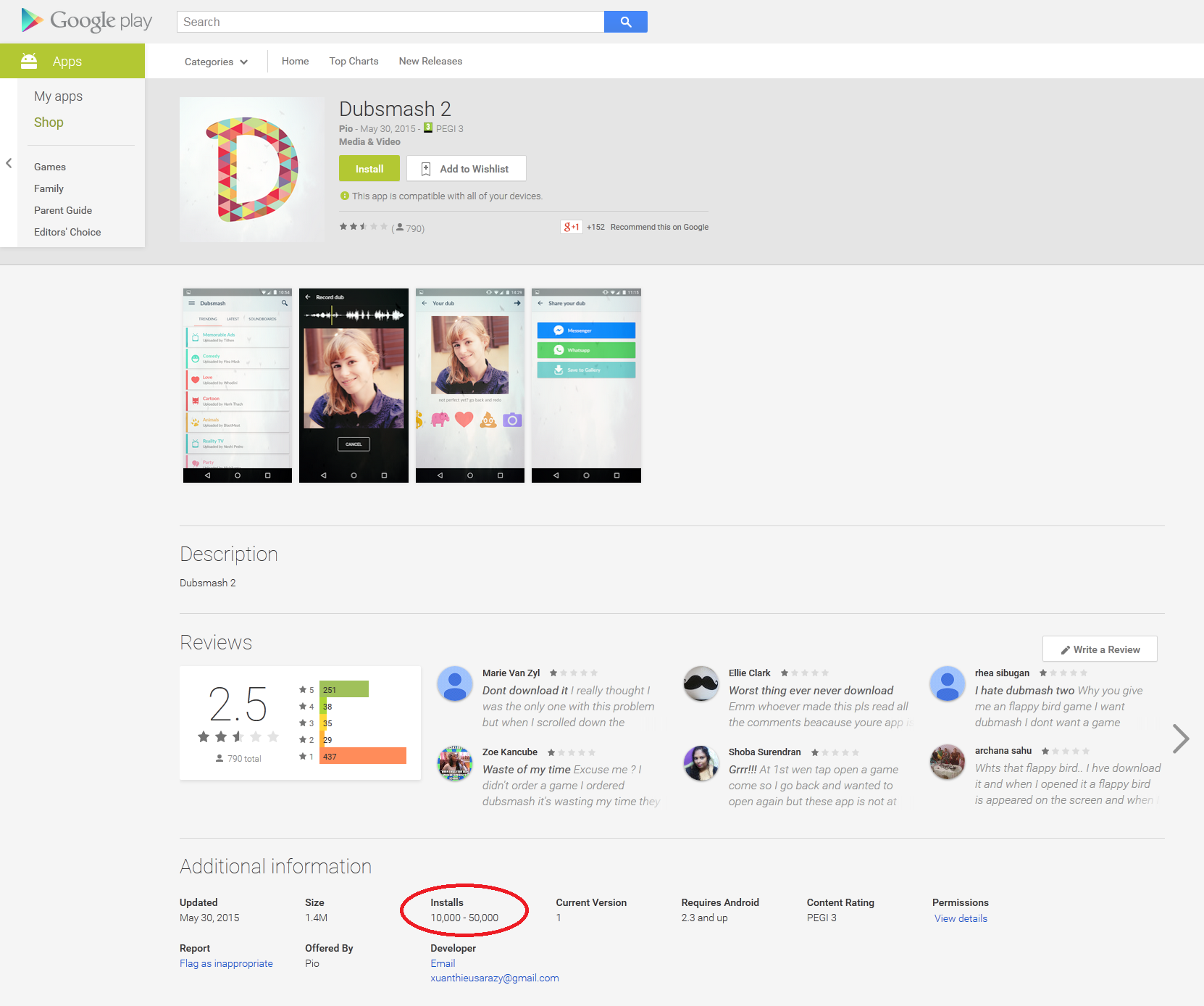
Figure 2 Fake Dubsmash 2
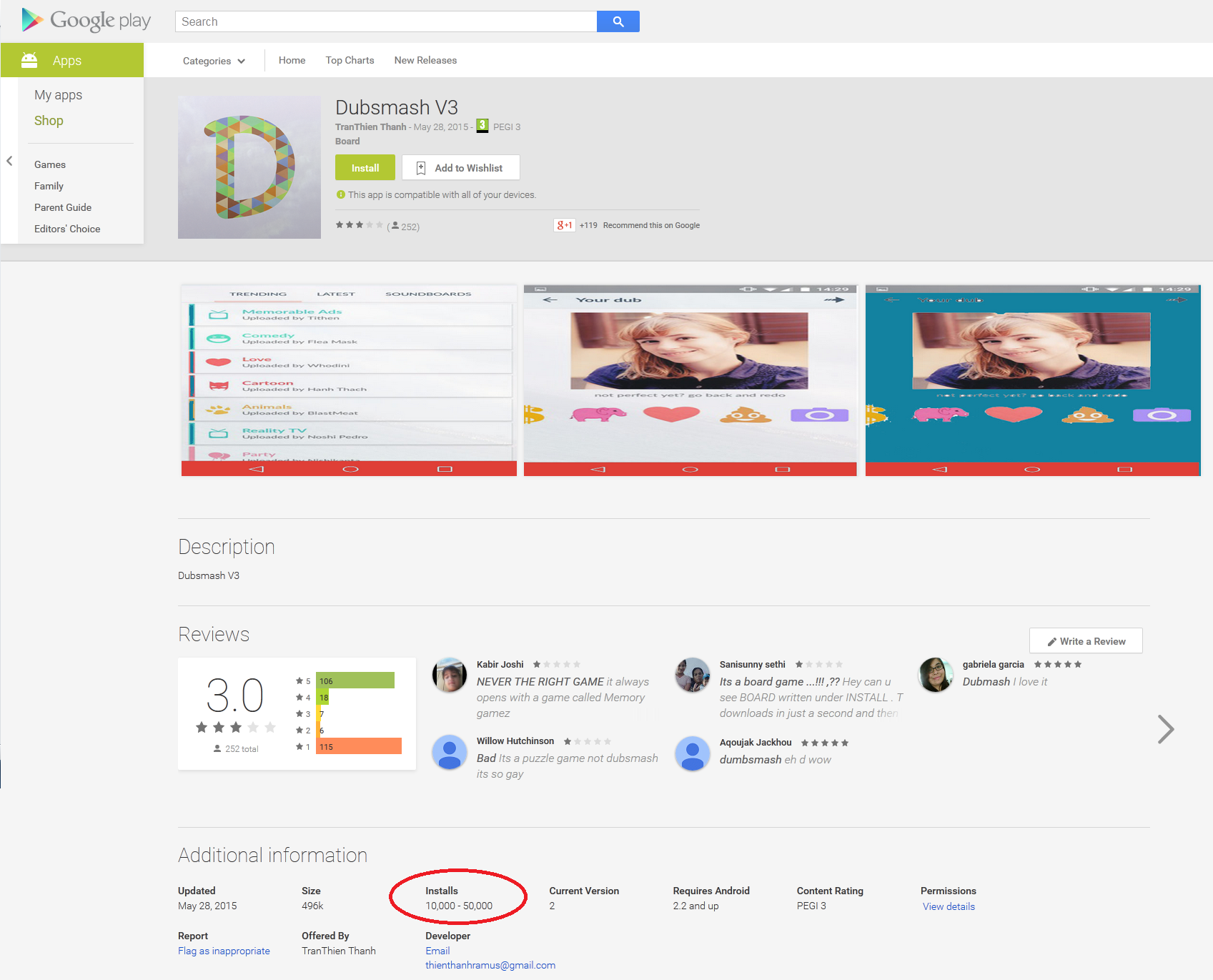
Figure 3 Fake Dubsmash V3

ESET is still seeing occurrences of this infiltration on Google Play and, after more than a month, these fake Trojan Clickers are still managing to evade Google’s Bouncer malware filter and potentially exposing millions of users to risk.
Figure 4 Porn clicker apps from Google Play

Interestingly, none of the fake applications will add a Dubsmash app icon to the app menu after installation. Instead the malicious apps pretend to be arcade games like Flappy Birds Family, board games or system applications.
Figure 5 Examples of Trojan app icons

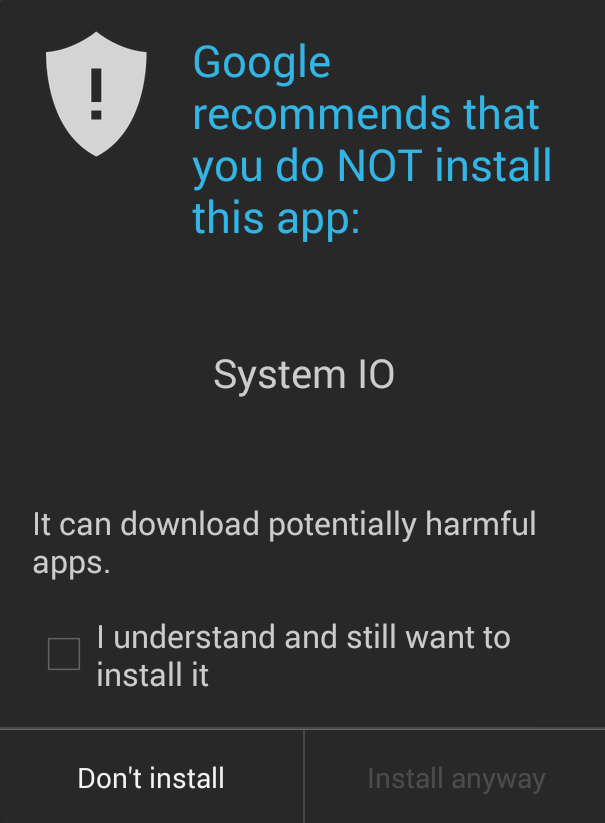
Following ESET’s notification, Google has pulled the malware from the Play Store and also reports some of them as potentially harmful applications using its built-in security service.
Figure 6 Google security service notification of potentially harmful app

Conclusion

Even though the malicious applications were available for download for at most a week, tens of thousands of people still installed them. Hopefully, Google is doing its best to fix this issue and find a way to prevent the developers of these porn clickers from publishing them to the Play Store. To reduce the risk from malicious apps that may have slipped through Google’s filtering, we advise Play Store customers to take careful note of reviews by other customers, and to ensure that their security software is kept up to date.

More information

App Name
Uploaded
Installs
Dubsmash 227 May 20150 - 10
Dubsmash V328 May 201510,000 – 50,000
Dubsmash 230 May 201510,000 – 50,000
Dubsmash 22 June 20150 - 10
Dubsmash 24 June 20150 - 10
Dubsmash 39 June 20150 - 10
Download Manager9 June 20150 - 10
Dubsmash 210 June 20150 - 10
Poo Video Downloader13 June 20150 - 10
Dubsmash 214 June 201510 - 50
Dubsmash 217 June 201510,000 – 50,000
Dubsmash 319 June 20151,000 – 5,000
Dubsmash 220 June 201510 - 50
Best : Dubsmash 3!1 July 20150 - 10
Komboatic1 July 20150 - 10
Best : Dubsmash4 July 201510,000 - 50,000
C l a s h o f C l a n s 24 July 2015100 - 500
Cheats for Clash of Clans6 July 20155,000 - 10,000
Dubs Mash 26 July 20151,000 - 5,000
Cheats & Trucos: Gta 56 July 201510 – 50
Maps & Guide: GTA 56 July 2015100 – 500
Subway Surfers 27 July 201550,000 – 100,000
Best : Dubsmash7 July 20151,000 – 5,000
Clash of Clans 28 July 20150 - 10
Pou 28 July 20155,000 - 10,000
Subway Surfers 38 July 20151,000 - 5,000
Followers for Instagram8 July 201510 - 50
MayHayda8 July 2015500 - 1,000
MayHada8 July 2015500 - 1,000
Man Kaptasi8 July 2015100 - 500
Smash Hit 29 July 2015500 – 1,000
Miviki yanki10 July 20151,000 – 5,000
Flipagram 210 July 2015100 – 500
Koday10 July 20150 - 10
Deer Hunter 201510 July 20150 - 10
Minecraft 313 July 20150 - 10
Red Ball 613 July 201550 - 100
Archery Master 413 July 20150 - 10
Exploration Lite 214 July 2015100 - 500
Traffic Racer 214 July 201550 - 100
Hitman Sniper 214 July 201550 - 100
Batman 214 July 201510 - 50
The Walking Dead 214 July 20150 - 10
Moto Loko 214 July 20150 - 10
Rally Racer 214 July 20150 - 10
Dr Driving 214 July 2015100 - 500
Survivor Heroes 215 July 20150 - 10
Dubsmash 215 July 201510 – 50
Hay Day 215 July 20150 -10
Subway Surfers 219 July 201510 - 50
Dubsmash 219 July 201510 - 50
Package Name
MD5
ESET Detection name
com.chbded.chs73DB1E459DA78A7C831209B687B6C12FAndroid/Clicker.M
com.jet.cleandub9334DAD2F7C9422E0D1C740D646C19DBAndroid/Clicker.J
com.jet.dubsh48A4BE6A7A6CBAB9C4A674F99E5158AAAndroid/Clicker.J
com.memr.gamessAC8D9DEEE2B07EF3A7C5BD2FC01560F1Android/Clicker.M
com.androsadfg.downloadmanager6CACBDD667504DC564050D5DD5CF683BAndroid/Clicker.M
com.jet.ayak28C5A7E4FC2E7CD446E03A88939596FDAndroid/Clicker.P
com.wngrd.mp3remote093412BCA7984039F5369DE6308D4C47Android/Clicker.M
com.jet.shdub11D32B18A096AE2D0F3D054BA0131492Android/Clicker.J
com.poo.downloaderB85EEF771BE83A33E233A8CA587C9B9DAndroid/Clicker.P
com.poo.db88C8F6715D5466DA7C1EB7DBAB7584A8Android/Clicker.P
com.poo.smm13AFF08E4733C953BC7DE6A5D7C02FD2Android/Clicker.P
com.huynoibomira.boboA845279F215ED6966B45D64E3369A1F2Android/Clicker.M
com.ti.basegam656E573C1277EE6607A0403CAA02AE25Android/Clicker.M
com.biz2048.yilinda331C93AFACD1433A2ECD7E5E7AEE9ADFAndroid/Clicker.M
com.rikona.sa390AE01ED49CBBE14EA91F347E806D8FAndroid/Clicker.M
com.kankalar.cheats167ABC463BC9C7A2D1EDC0E383806499Android/Clicker.M
com.kankalar.clash2F297E5A18A4025ECB0F34C8BF905B3F1Android/Clicker.M
com.kankalar.elma5AF9E1DE3D1D19DACB1AA98288E1CA25Android/Clicker.M
com.sulale.chetastga08B320694B898B0F6402FA8B45D301F8Android/Clicker.M
com.sulale.cimmi249A0660F18C53D91B58A680D78E9EC4Android/Clicker.M
com.sulale.dubbD11BB0B91595E6B6DE89FB7BF2C92F83Android/Clicker.M
com.poo.cofc4FBC4AB39C704088902A6C114A44F0F3Android/Clicker.Q
com.poo.po98961261BC663F4D3E6F073CE6575A48Android/Clicker.Q
com.poo.way3E62E455A15D99762198F8C5779F81AFAndroid/Clicker.Q
com.poo.xDC78620AA75EDBB846776760A88AE17AAndroid/Clicker.Q
com.nguyenngocjumraze.suuu21679FE29217DB6925B17CC4BF1FCE9BAndroid/Clicker.M
com.nguyenngocjumraze.takip3FD37BB6250F08A58C8932C630F57C4CAndroid/Clicker.M
com.fet.hiye47BE311A6CDA5B4981DB282CA1884BC9Android/Clicker.M
com.kendo.yakoB0345E9392F2C79D2403B18FB7FFD419Android/Clicker.M
com.nhantieplosengazi.flip44D7A2E9B3D106C4D41311E23350A813Android/Clicker.M
com.nhantieplosengazi.kivi189E5E23A99AF963DBFD70FD9552661EAndroid/Clicker.M
com.phutanjocohare.concCB6A3918CFFA7BEEF2EAD6E5C60F2A3EAndroid/Clicker.M
com.phutanjocohare.jat647987E48CF037E57CEEC6CB282F8124Android/Clicker.M
com.phutanjocohare.may9E4B0ADC7B4CF2353859EADBB928C688Android/Clicker.M
com.pupa.yelken5B35B0D5E04F9CDCFFF66D376805ADDFAndroid/Clicker.M
com.xuanjonaterilove.sma402AEF32A99C71602A51FF8A36F5ABFEAndroid/Clicker.M
com.fryzombisaren.haa4462CDA324E272FA63511D77486B82B9Android/Clicker.M
com.fryzombisaren.hte12D2DF188BAF7523BB04AC7735E6C818Android/Clicker.M
com.cor2.luFAD2ABC5DBD0F081EB3E9509EA7840E9Android/Clicker.M
com.eski.hisar8C4AC0AD1435264D3219DB45FEC627F9Android/Clicker.M
com.isken.derunEC6359CEF3E0933467F62DD31F20AF09Android/Clicker.M
com.kasta.monu0D93F4278FC8288CEAA8FE5933BA64C6Android/Clicker.M
com.manisa.turgutluFFB92BA3236CC5C9DF9A2EF5EDB3BDE2Android/Clicker.M
com.pamuk.kale474EA15E00B1EF9A29F1BF624B78FA4BAndroid/Clicker.M
com.thanhbangzerisa.bat1C4C8380C51CECDA01D40A841601A0BDAndroid/Clicker.M
com.thanhbangzerisa.deFE6B42F3872014C1CB4374611676B754Android/Clicker.M
com.thanhbangzerisa.ex97804ADBA13B706A3EA232FD28DC9B4DAndroid/Clicker.M
com.thanhbangzerisa.hiAF96768436794CE6161A4A62C82F5A0DAndroid/Clicker.M
com.thanhbangzerisa.titaE3E4984C3143B8461B38B187A31A0BEFAndroid/Clicker.M
com.xuantonglazaderi.duD59B2C7A28AE19FF2B85DB9C2EEEF29BAndroid/Clicker.M
com.xuantonglazaderi.su21E5B2B33CF0A4AE45BF29C7C848C5F60Android/Clicker.M

ที่มา : welivesecurity.com

Information

==============================================
PeeTechFix >> JupiterFix
==============================================
Photobucket

วิธีใช้งาน : JupiterFix-Win32.PSW.OnlineGames
ท่านสามารถตรวจสอบรายชื่อ Virus ที่โปรแกรม สามารถ Clean ได้ ใน VirusList.txt
-------------------------------------------------------------------------------------
ท่านใดที่ Download PeeTechFix tool ไปใช้แล้วมีปัญหาหรือลบไม่ออก โปรดแจ้งปัญหา ที่ email : MalwareHunter.info@gmail.com ด้วยครับ หรือส่งไฟล์ virus ให้ด้วย จะขอบพระคุณอย่างยิ่ง
-------------------------------------------------------------------------------------
Safemode Recovery (.reg) แก้ปัญหา Virus ลบ Key Safeboot แล้วเข้า safemode ไม่ได้
------------------------------------------------------------------------------------
วิธีแก้ Error message (แก้อาการเปิดไฟล์ .exe ใน USB Drive ไม่ได้)
"Windows cannot open this program because it has been prevented by a software restriction policy. For more information, open Event Viewer or contact your system administrator"
วิธีแก้ ดูที่ link นี้ครับ
-------------------------------------------------------------------------------------
วิธีแก้ MSN /Windows Live Messenger Disconnect (จาก virus OnlineGames)
-------------------------------------------------------------------------------------
How to start Windows in Safe Mode

Popular Posts